Showing posts with label Displays & Gauges. Show all posts

Saturday, March 7, 2026

PSCockpit Displays&Gauges Software V.1.0.3 Update

The new version V.1.0.3 auto installable version of the PSCockpit Displays&Gauges Software is available for download!!

Do not forget to install and run this version with admin rights!

You can download it at: Download

No firmware update is needed.

PSCockpit Displays&Gauges Software V.1.0.3 Changelog:

- Added Log file
- Added Shared Memory variables from BMS 4.38 U1
- Added CMDS OLED display
- Added steppers scales

Regards,
Shep

Sunday, March 1, 2026

PSCockpit 2026 Run

Time to launch a new year run of the PSCockpit System!!Those of you who don’t know yet how this system, please read the following links:

PS Cockpit System F16 distribution file for Main and Displays&Gauges boards: https://psfalcon.blogspot.com/2026/03/f16c-b50-pscockpit-pcbs-distribution.html

PSCockpit System: https://psfalcon.blogspot.com/2025/01/ps-cockpit-system-description.html

PSCockpit Displays and Gauges: https://psfalcon.blogspot.com/2025/01/pscockpit-displays-gauges-system.html

More information, downloads and guides at:
https://psfalcon.blogspot.com/2015/05/pscockpit-system-up-to-date-software.html

This Run features these new items:
• AUXCOMM pcb (100€)
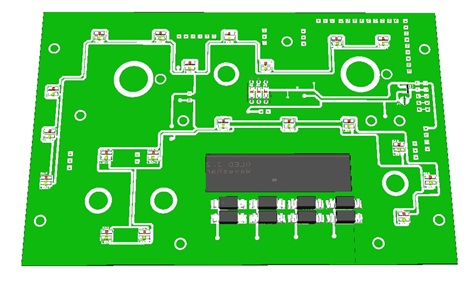


The AUXCOMM board comes with the following elements:
- (1) 40 I/O chip to be connected to the digital I/O I2C channel of the PSCockpit system and its elements (resistors, connectors, …) to work with 5V to drive the elements of the panel.
- (3) Toggle switches ON-OFF-ON for IFF REPLY, T/R and M4-Code.
- (1) Toggle switch ON-OFF for Monitor Audio.
- (8 ) Pushbuttons for Channel Selection.
- (1) OLED display for Channel Digits
- (1) PLA printed set of pieces to emulate Digilever channel selectors
- (20) SMD leds for lettering backlight.
- (18) Free digital I/Os

You will find the following elements in the backside:
- (1) Connector for backlight illumination.
- (2) Connectors for digital I/O I2C channel.
- (2) Mini-switch to select 16I/O and 40I/O chips I2C channel addresses.
- (1) Connector for free digital I/Os.

You can use the free I/Os to connect your real Digilever channel selectors. In this case the PCB will be sent with no OLED display nor PLA printed set for a price of 60€.

To complete the AUXCOMM panel, you will need to add the following elements:
- AUXCOMM front panel
- AUXCOMM knobs

• Seat Ejection Handle (15€)
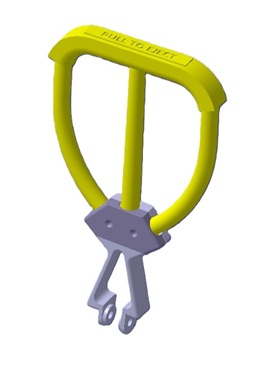


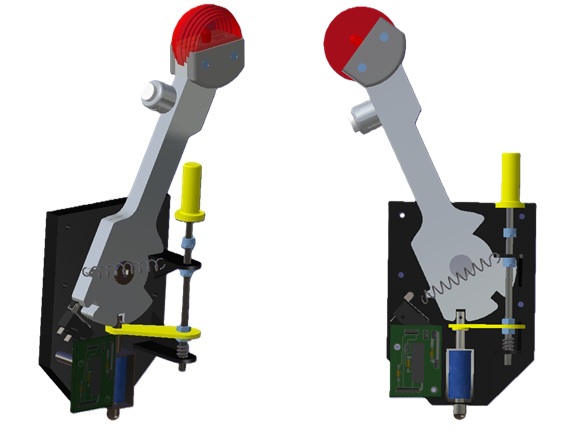
3D printed in grey PLA (base) and yellow flexible TPU (handle).

PSCockpit System Prices:
The prices of PCB’s already mounted and tested are the following:
- Main Board V2 PCB: 80€
- Digital expander for 40 inputs/outputs: 33 €
- Digital expander 16 inputs/outputs: 10 €
- Steppers/Other voltage outputs pcb: 28 €
- 7 segment displays pcb for 6 displays: 18 €
- Analogue pcb for 4 inputs/ 1 output: 20 €
- I2CtoSPI pcb: 25€
- Aircore Controller pcb: 24€
- Aircore pcb: 15€
- Vibration motors pcb: 38€
- I/O Enhancement pcb: 6,5€
- Caution Panel board: 40€
- UHF board: 90€
- ICP pcb Rev 1: 90€
- CMDS board (with 2 rotary switches 30º & 45º, no toggles, no displays): 80€
- CMDS options:
- Miniature toggles 6 mm diam. (1 with locking lever): 50€
- SGL2016 displays Not available
- HDLG-1414 displays: At market price
- 7 segment displays pcb with 8 displays: 35€
- TWP board: 40€
- TWA board: 20€
- X40 stepper board: 20€
- PWM board: 20€
- ELEC board: 50€
- AUDIO1 & AUDIO2 board: 100€
- TRIM board: 80€
- TRIM INDICATOR board: 15€
- ECM pcb: 100 €
- CPD pcbs for one CPD: 90€
- EHSI pcb: 20 €

PSCockpit Displays&Gauges System Prices:
The prices of the PCB’s already mounted and tested are the following:
- Displays & Gauges pcb: 55€
- X27 stepper pcb: 15€
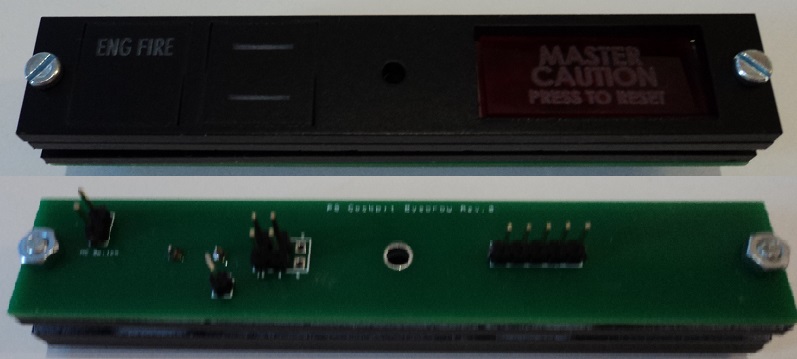
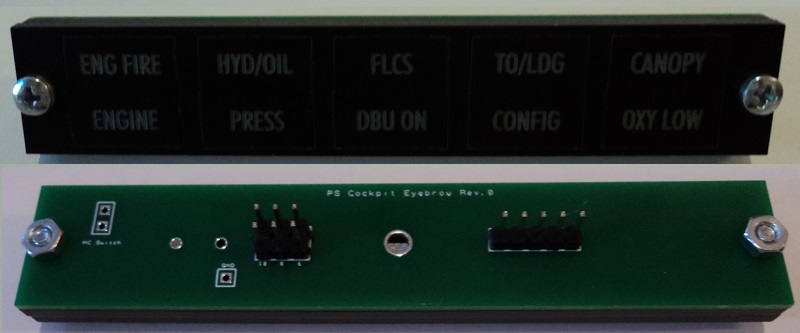
- Eyebrow lights pcb: 15€
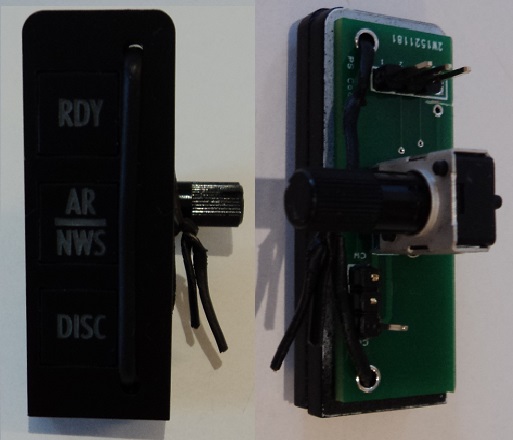
- Indexer pcb: 15€
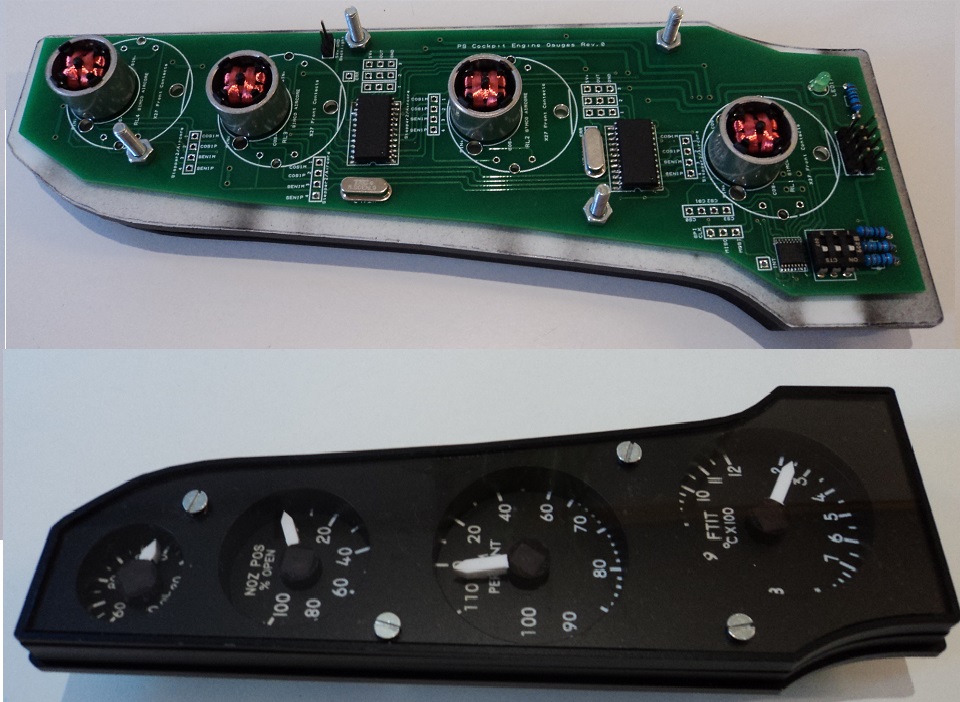
- Engine Gauges for Aircores with electronics for PSCockpit System pcb: 90€
- Engine Gauges for X27 or Aircores without electronics: 65€
- Hyd pcb: 15€

3D Printed Components:
- Gear Landing Set: 90€
- Canopy Spider Set: 20 €

- Shipments: 10€/ 18€ / 28€ depending on the total weight order and country

Time Line:
- Orders and payments will be accepted until March. 29th. 2026
- Only direct bank transfers. Sorry for the inconvenience.
- Delivery: From May 2026

Thanks everybody for your support.
Shep

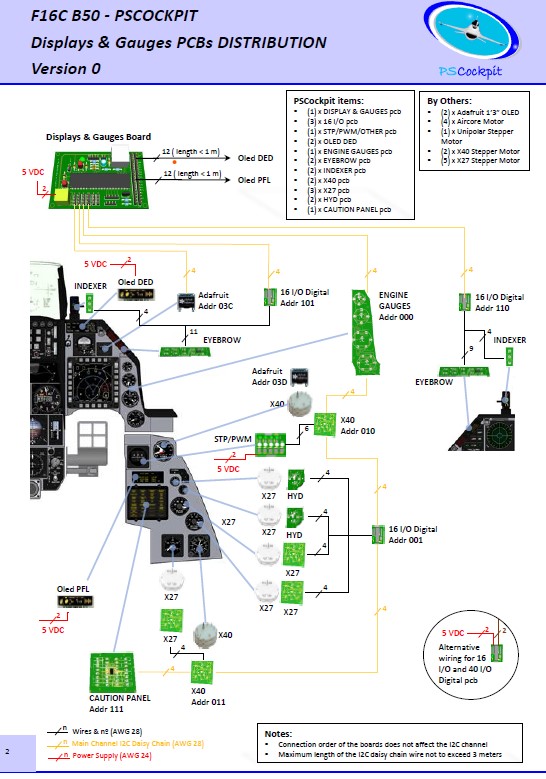
F16C B50 PSCockpit PCBs Distribution Files Run 2026

 New F16 PSCockpit pcbs distribution for Run 2026 for Main Board and Main+Displays&Gauges boards.


You can download both distribution files in pdf format at:

F16 Distribution Files Run 2026

Regards,
Shep

Saturday, January 25, 2025

PSCockpit 2025 Run. Entering new world!

Time to launch a new run of the PSCockpit System!!

Those of you who don’t know yet how this system, please read the following links:

PS Cockpit System F16 distribution file for Main and Displays&Gauges boards: https://psfalcon.blogspot.com/2022/08/ps-cockpit-system-f16-distribution-file_17.html

PSCockpit System: PS Tools: https://psfalcon.blogspot.com/2025/01/ps-cockpit-system-description.html

PSCockpit Displays and Gauges: https://psfalcon.blogspot.com/2025/01/pscockpit-displays-gauges-system.html

More information, downloads and guides at:
https://psfalcon.blogspot.com/2015/05/pscockpit-system-up-to-date-software.html

This run features these new items:
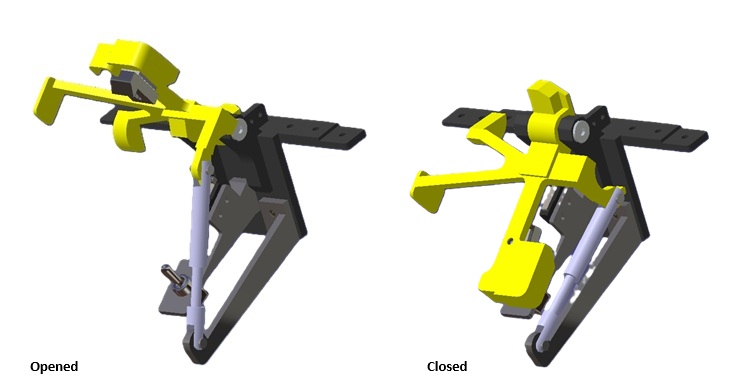
Gear Landing Set


Canopy spider Set


Both sets 3D printed in PLA and come with their necessary elements (springs, switches, limit switches, 12V coil, pcb, for correct operation an interface with PSCockpit System or any other I/O system.
- Gear Landing Set: 90€
- Canopy Spider Set: 20 €


PSCockpit System Prices:
The prices of the PCB’s already mounted and tested are the following:
- Main Board V2 PCB: 80€
- Digital expander for 40 inputs/outputs: 33 €
- Digital expander 16 inputs/outputs: 10 €
- Steppers/Other voltage outputs pcb: 28 €
- 7 segment displays pcb for 6 displays: 18 €
- Analogue pcb for 4 inputs/ 1 output: 20 €
- Yellow OLED display (85mm x 40mm), 256x64 for DED or PFL: 65 €
- I2CtoSPI pcb: 25€
- Aircore Controller pcb: 24€
- Aircore pcb: 15€
- Vibration motors pcb: 38€
- I/O Enhancement pcb: 6,5€
- Caution Panel board: 40€
- UHF board: 90€
- ICP pcb Rev 1: 90€
- CMDS board (with 2 rotary switches 30º & 45º, no toggles, no displays): 80€
- CMDS options:
- Miniature toggles 6 mm diam. (1 with locking lever): 50€
- SGL2016 displays Not available
- HDLG-1414 displays: 35€ (each)
- 7 segment displays pcb with 8 displays: 35€
- TWP board: 40€
- TWA board: 20€
- X40 stepper board: 20€
- PWM board: 20€
- ELEC board: 50€
- AUDIO1 & AUDIO2 board: 100€
- TRIM board: 80€
- TRIM INDICATOR board: 15€
- ECM pcb: 100 €
- CPD pcbs for one CPD: 90€
- EHSI pcb: 20 €

PSCockpit Displays&Gauges System Prices:
The prices of the PCB’s already mounted and tested are the following:
- Displays & Gauges pcb: 55€
- X27 stepper pcb: 15€
- Eyebrow lights pcb: 15€
- Indexer pcb: 15€
- Engine Gauges for Aircores with electronics for PSCockpit System pcb: 90€
- Engine Gauges for X27 or Aircores without electronics: 65€
- Hyd pcb: 15€

Other components by demand:
- Engine Gauges, Eyebrow and Indexer panels
- Gauge panels
- Stepper motors X27
- Aircore Motors

- Shipments: 10€/ 18€ / 28€ depending on the total weight order and country

Time Line:
- Orders and payments will be accepted until Feb. 28th. 2025
- Only direct bank transfers. Sorry for the inconvenience.
- Delivery: From April 2025

Thanks everybody for your support.
Shep

PSCockpit Displays & Gauges System Description

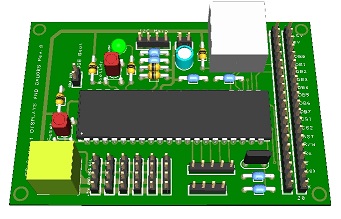
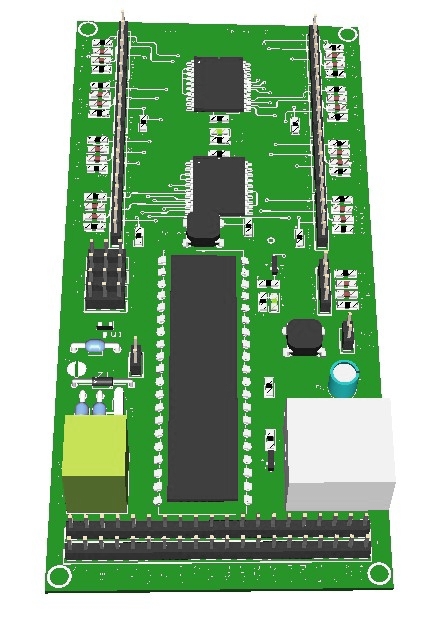
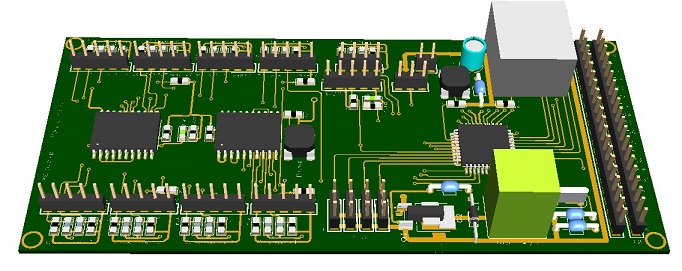
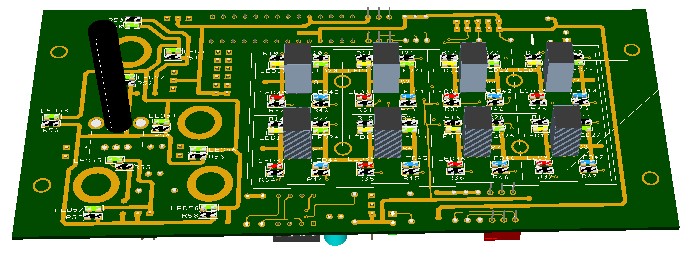
This PSCockpit Displays & Gauges System PCB drives the gauges and displays of the F16 pit reducing the load of the PSCockpit Main Board by reducing its processing time.

The Displays & Gauges Board is already configured giving a plug&play solution for people with less electronic knowledge.

PSCockpit users can use the same PSCockpit boards they already have in their pit and/or redistribute the boards between both systems PSCockpit Main Board and PSCockpit Displays & Gauges Board.

The modular concept of the Displays & Gauges Board allows users to select the displays and gauges they want to drive in their pit, adding other elements at any time.

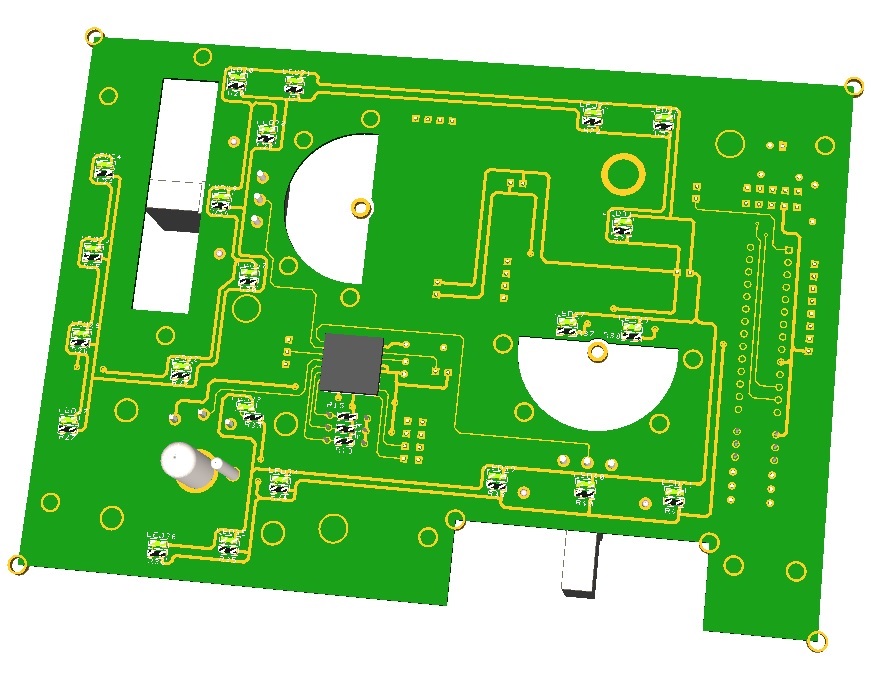
For desktop pits or mini-pits users the Displays & Gauges Board can drive eyebrow lights, indexer lights and some other lights of the F16 Center console.


The Displays & Gauges Board is able to drive the following elements of the F16 pit:
- (2) x PSCockpit OLED displays for DED and PFL displays.
- (2) x Adafruit Monochrome OLED displays for Fuel Flow and Total Fuel indicators
- (14) x Stepper motors X40 or X27 for LIQ OXY, EPU Fuel, HYDA, HYDB, Total Fuel, Watch, Cabin Pressure, Roll Trim, Pitch Trim, Oxy Press, Speed Brake and Compass (with Unipolar Stepper Motor) gauges
- (4) x Aircore motors for Oil Pressure, Nozzle Pos, RPM and FTIT engine gauges.
- (2) x PSCockpit 16I/O boards for Eyebrow Lights, NWS and AOA lights, LG lights
- (1) x PSCockpit Caution Panel board.

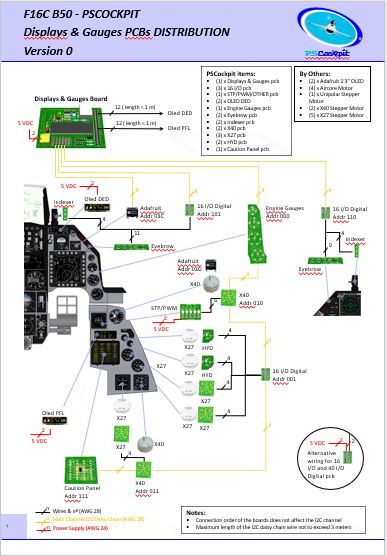
The Displays & Gauges Board distribution for the F16 is the following:


You can download the F16 Displays & Gauges Distribution here: http://www.mediafire.com/file/j5p0gxo393t04q5/file

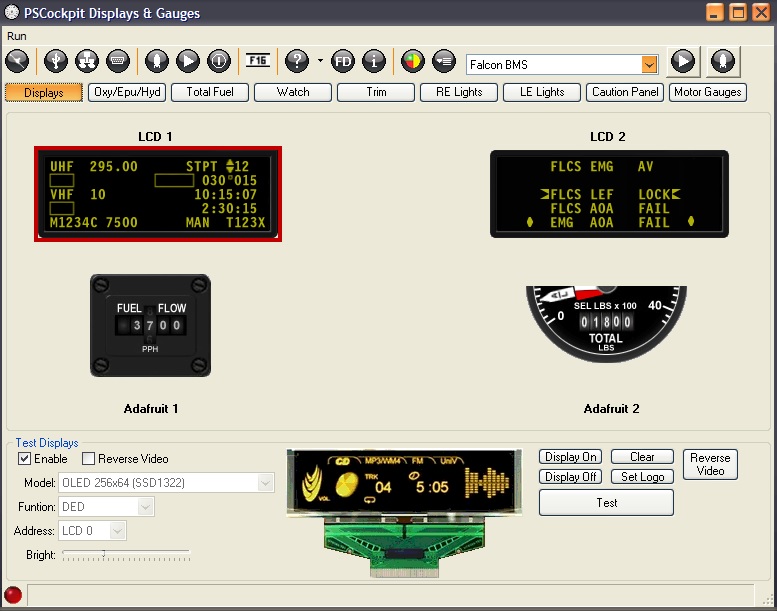
The Displays & Gauges Board has its own standalone software for Falcon BMS and DCS sims:


For new users, the Displays & Gauges Board, depending on your needs, can be completed with the following PSCockpit items:
- DED display: (1) PSCockpit OLED display
- PFL display: (1) PSCockpit OLED display
- Total Fuel Indicator: (1) PSCockpit X40 pcb + Adafruit display + X40 stepper motor
- Watch: (1) PSCockpit X40 pcb + Adafruit display + X40 stepper motor
- LIQ OXY, EPU Fuel, HYDA and HYDB gauges: (1) PSCockpit 16 I/O pcb + (4) PSCockpit X27 pcb + (4) X27 stepper motor
- Roll Trim, Pitch Trim, Oxy Press, Speed Brake gauges: (1) PSCockpit 16 I/O pcb + (4) PSCockpit X27 pcb + (4) X27 stepper motor
- Right Eyebrow and NWS lights: (1) PSCockpit 16 I/O pcb
- Left Eyebrow, AOA and LG lights: (1) PSCockpit 16 I/O pcb
- Caution Panel: (1) PSCockpit Caution Panel pcb
- Engine gauges: (1) PSCockpit Engine Motors pcb + (4) Aircore motors

You can find more info about PSCockpit system here:
http://psfalcon.blogspot.com.es/2015/05/pscockpit-system-up-to-date-software.html

Regards,
Shep

Sunday, June 16, 2024

PSCockpit Displays&Gauges Software V.1.0.2 Update

 The new version V.1.0.2 auto installable version of the PSCockpit  Displays&Gauges Software is available for download!!

Do not forget to install and run this version with admin rights!

You can download it at: Download

No firmware update is needed.

PSCockpit Displays&Gauges Software V.1.0.2 Changelog:
- Revised Shared Memory Area for BMS 4.37u4
- DED and PFL displays rotation option
- Data extraction from DCS via UDP port
- PSCockpit Shared Memory reader added

Regards,
Shep

Sunday, January 14, 2024

PSCockpit 13th Run. Time to upgrade to CPD or EHSI?

Time to launch a new run of the PSCockpit System!!
Those of you who don’t know yet how this system, please read the following links:

PS Cockpit System F16 distribution file for Main and Displays&Gauges boards: https://psfalcon.blogspot.com/2022/08/ps-cockpit-system-f16-distribution-file_17.html

PSCockpit System: PS Tools: https://psfalcon.blogspot.com/2020/01/pscockpit-9th-run.html

PSCockpit Displays and Gauges: PS Tools: https://psfalcon.blogspot.com/search/label/Displays%20%26%20Gauges

More information, downloads and guides at:https://psfalcon.blogspot.com/2015/05/pscockpit-system-up-to-date-software.html


This run features these new boards:
• CPD pcbs


For easy shipment, these boards come in 4 units:


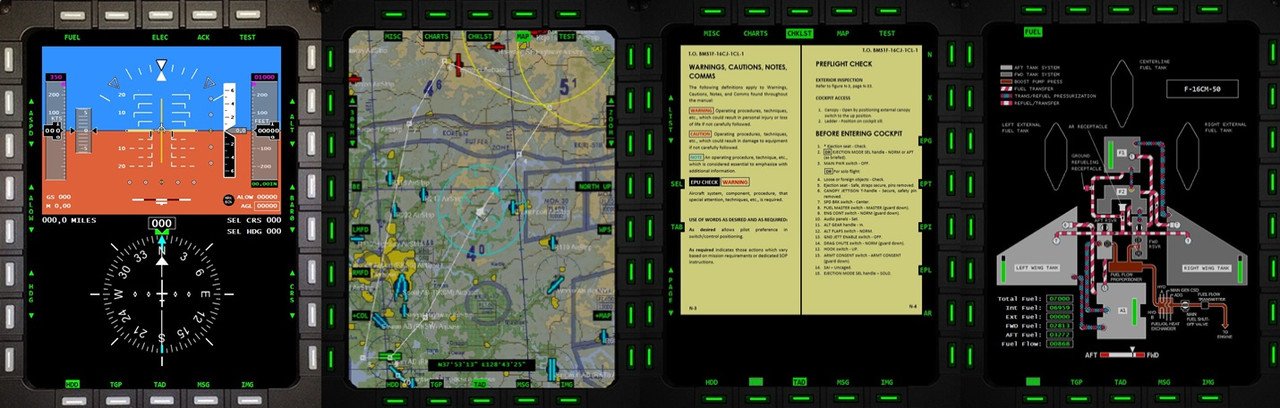
Currently working on the CPD software with charts, checklists, map, fuel system:


• EHSI pcb


• PSCockpit Main Board V2:


PSCockpit System Prices:
The prices of the PCB’s already mounted and tested are the following:
NEW BOARDS:
- CPD pcbs for one CPD: 90€
- EHSI pcb: 20 €
- New Main V2 PCB: 80 €

Other boards:
- Digital expander for 40 inputs/outputs: 33 €
- Digital expander 16 inputs/outputs: 10 €
- Steppers/Other voltage outputs pcb: 28 €
- 7 segment displays pcb for 6 displays: 18 €
- Analogue pcb for 4 inputs/ 1 output: 20 €
- Yellow OLED display (85mm x 40mm), 256x64 for DED or PFL: 65 €
- I2CtoSPI pcb: 25€
- Aircore Controller pcb: 24€
- Aircore pcb: 15€
- Vibration motors pcb: 38€
- I/O Enhancement pcb: 6,5€
- Caution Panel board: 40€
- UHF board: 90€
- ICP pcb Rev 1: 90€
- CMDS board (with 2 rotary switches 30º & 45º, no toggles, no displays): 80€
- CMDS options:
- Miniature toggles 6 mm diam. (1 with locking lever): 50€
- SGL2016 displays Not available
- HDLG-1414 displays: 35€ (each)
- 7 segment displays pcb with 8 displays: 35€
- TWP board: 40€
- TWA board: 20€
- X40 stepper board: 20€
- PWM board: 20€
- ELEC board: 50€
- AUDIO1 & AUDIO2 board: 100€
- TRIM board: 80€
- TRIM INDICATOR board: 15€
- ECM pcb: 100 €

PSCockpit Displays&Gauges System Prices:
The prices of the PCB’s already mounted and tested are the following:
- Displays & Gauges pcb: 55€
- X27 stepper pcb: 15€
- Eyebrow lights pcb: 15€
- Indexer pcb: 15€
- Engine Gauges for Aircores with electronics for PSCockpit System pcb: 90€
- Engine Gauges for X27 or Aircores without electronics: 65€
- Hyd pcb: 15€

Other components by demand:
- Engine Gauges, Eyebrow and Indexer panels
- Gauge panels
- Stepper motors X27
- Aircore Motors

- Shipments: 10€/ 18€ / 28€ depending on the total weight order and country

Timeline:
- Orders and payments will be accepted until Feb. 18th. 2024
- Only direct bank transfers. Sorry for the inconvenience.
- Delivery: April 2024

Thanks everybody for your support.
Shep

Saturday, April 15, 2023

PSCockpit and Displays&Gauges Systems 12th Run!!!


Time to launch a new run of the PSCockpit System!!
Those of you who don’t know yet how this system, please read the following links:

PS Cockpit System F16 distribution file for Main and Displays&Gauges boards: https://psfalcon.blogspot.com/2022/08/ps-cockpit-system-f16-distribution-file_17.html

PSCockpit System: PS Tools: https://psfalcon.blogspot.com/2020/01/pscockpit-9th-run.html

PSCockpit Displays and Gauges: PS Tools: https://psfalcon.blogspot.com/search/label/Displays%20%26%20Gauges

More information, downloads and guides at:https://psfalcon.blogspot.com/2015/05/pscockpit-system-up-to-date-software.html

This run features the new PSCockpit Main Board V2 and the ECM pcb:


More info about these boards to follow.

PSCockpit System Prices:
The prices of the PCB’s already mounted and tested are the following:
- New Main V2 PCB: 80 €
- ECM pcb: 100 €

- Digital expander for 40 inputs/outputs: 33 €
- Digital expander 16 inputs/outputs: 10 €
- Steppers/Other voltage outputs pcb: 28 €
- 7 segment displays pcb for 6 displays: 18 €
- Analogue pcb for 4 inputs/ 1 output: 20 €
- Yellow OLED display (85mm x 40mm), 256x64 for DED or PFL: 65 €
- I2CtoSPI pcb: 25€
- Aircore Controller pcb: 24€
- Aircore pcb: 15€
- Vibration motors pcb: 38€
- I/O Enhancement pcb: 6,5€
- Caution Panel board: 40€
- UHF board: 90€
- ICP pcb Rev 1: 90€
- CMDS board (with 2 rotary switches 30º & 45º, no toggles, no displays): 80€
- CMDS options:
- Miniature toggles 6 mm diam. (1 with locking lever): 50€
- SGL2016 displays Not available
- HDLG-1414 displays: 35€ (each)
- 7 segment displays pcb with 8 displays: 35€
- TWP board: 40€
- TWA board: 20€
- X40 stepper board: 20€
- PWM board: 20€
- ELEC board: 50€
- AUDIO1 & AUDIO2 board: 100€
- TRIM board: 80€
- TRIM INDICATOR board: 15€

PSCockpit Displays&Gauges System Prices:
The prices of the PCB’s already mounted and tested are the following:
- Displays & Gauges pcb: 55€
- X27 stepper pcb: 15€
- Eyebrow lights pcb: 15€
- Indexer pcb: 15€
- Engine Gauges for Aircores with electronics for PSCockpit System pcb: 90€
- Engine Gauges for X27 or Aircores without electronics: 65€
- Hyd pcb: 15€

Other components by demand:
- Engine Gauges, Eyebrow and Indexer panels
- Gauge panels
- Stepper motors X27
- Aircore Motors

- Shipments: 10€/ 18€ / 28€ depending on the total weight order and country


Time Line:
- Orders and payments will be accepted until May. 31st. 2023
- Only direct bank transfers. Sorry for the inconvenience.
- Delivery: Starting July 2023

Thanks everybody for your support.
Shep
Saturday, January 14, 2023

PSCockpit Displays&Gauges Software V.1.0.1 Update

The new version V.1.0.1 auto installable version of the PSCockpit  Displays&Gauges Software is available for download!!

Do not forget to install and run this version with admin rights!

You can download it at: Download

Firmware update is needed to use DED and PFL brightness and "Show PFL on DED" new functionalities. You can update firmware from the Help/Software Update option.

PSCockpit Displays&Gauges Software V.1.0.1 Changelog:
- Revised Shared Memory Area for BMS 4.37
- Added Firmware update procedure (Help/Firmware Update)
- Revised PSDisplyas&Gauges Quick Guide to version V2 (Help/QuickGuide)
- Updated help links (How To's Online)
- Changed Export .lua files for DCS 2.7.18
- Changed Clock routine to use winding features in DCS F-16
- Added keystroke timer (Options)
- Added DED and PFL brightness control encoder in Caution Panel pcb (Quick Guide)
- Added pcb's DIP pictures to show on forms. 
- Added DCS G-force reading to F-16 airplane.
- Added advise on the right bottom corner when PSCockpit is not used with Administrator rights
- Added auto installation of the DCS export files for PSCockpit (Options)

- Corrected COMPASS and Oxygen Pressure gauges that were swaped. For existing installations. please change this lines in your .ini file
as follows:
STPR06=12,Oxygen Pressure,......
STPR12=6,Compass,......

- Revised the "Show PFL on DED" funtionality to meet the new operation of the PFL of BMS 4.36 (Airplane Model /Special I/Os): As the PFL doesn't show "All systems OK" in BMS 4.36, the first push of F-ACK pushbutton, the PFL will show up in the PFL display and no command will be sent to BMS. The DED display will show up again the fitfh F-ACK pulsation.

Regards,
Shep

Thursday, December 29, 2022

PSCockpit Runtime and Timers

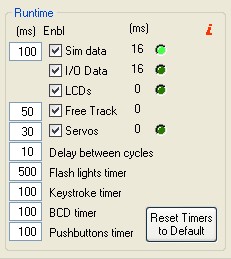
To improve the runability of PSCockpit with your favorite simulator you will need at sometime to deal with PSCockpit timers. The functionality of the timers is described below.

You can access the Runtime and Timers by clicking on “USB Timers”:


Sim Data Timer

The first timer is the Sim Data Timer and controls the Sim Data, I/O Data and LCDs routines where the following operations are made:

  • Sim data: the data is read from the simulator.
  • I/O Data: if the expanders aren’t polled in “Exp. Interrupt” mode, the inputs from the pcb’s are read and the commands are sent to the simulator. Then, the outputs of the pcb’s are set. if the expanders are polled in “Exp. Interrupt” mode, the commands are sent as soon as they are received from the Main Board.
  • LCD`s: the data of the LCD’s is sent to the Main Board.
With the checkboxes under the column “Enbl” you can tell the program to skip one of the above subroutines. The checkboxes values are not saved in the configuration file, and they will show up as checked as soon as you run PSCockpit again. They are only valid for troubleshooting purposed as described below.

The third column shows the time in milliseconds that the program takes to complete each subroutine and the led indication shows in which subroutine the program is.

The elapsed time showed beside Sim Data is the total time to complete a cycle and includes the subroutine times and the delay between cycles.

In case you are suffering any delay retrieving data from the simulator or from your pcb’s, you can check what routine is taken the most time to complete and deactivate it to review the behavior of all the other subroutines.

Free Track Timer

This timer controls the time the subroutine is ran to get the data from the Free Track. Free Track in PSCockpit is used to control the projector movement and/or the side views of your simulator. In this way, you can configure when to change to a certain view in your simulator depending on the Free Track data. Unchecking this checkbox avoid the program to enter the subroutine but does not deactivate the use of Free Track. If you want to deactivate Free Track, enter Free Track page and uncheck “Use Free Track Data” checkbox in that page.

The third column shows the time in milliseconds that the program takes to complete this subroutine.

Servos Data

This timer controls the refreshing time of the gauges driven by servos, aircores and/or steppers. Be aware that, even if you set this timer to 0, the gauges won’t move until the data of the sim is read, which is controlled by the Sim Data timer. Thus, this timer shouldn’t be lower than the Sim Data Timer.

For troubleshooting purposes, you can tell the program to skip this subroutine by unchecking the “Enbl” checkbox. The checkbox value is not saved in the configuration file, and it will show up as checked as soon as you run PSCockpit again.

The third column shows the time in milliseconds that the program takes to complete this subroutine and the led indication shows when the program is running it.

Delay Between Cycles

This timer controls the time to run another cycle. This time is needed to setup some configurations internals as the 8x4 matrix cycle.

Flash Lights Timer

This timer controls the time of flashing for the outputs configured as “Flash Leds” in the IO Layout.

Keystrokes Timer

PSCockpit sends the commands to your simulator by means of virtual keystrokes. This timer controls the time that the virtual keystrokes are held as pushed. Some of the tested sims doesn’t react when sending a simple tick of a key combination. If this is the case, increase this timer until the sim react to your commands.

BCD Timer

When using BCD combinations, the diodes and electronics need some setup time. This timer controls the time from the physical action of pushing a pushbutton of a BCD matrix and the reading time of PSCockpit. Thus, this timer avoids phantom inputs as well as wrong commands sent to the simulator. Be aware that you will need to hold down the pushbutton all the amount of time set in this timer for PSCockpit to react.

Pushbuttons Timer

As well as the BCD timer, this timer controls the time from the physical action of pushing a single pushbutton and the reading time of PSCockpit. Thus, this timer avoids phantom inputs as well as wrong commands sent to the simulator. Be aware that you will need to hold down the pushbutton all the amount of time set in this timer for PSCockpit to react.

Reset Timers to Default

Self-explanatory.

High Elapsed Time symptom’s

If any of the elapsed times are much higher than expected, it can be a symptom of a bad configuration of PSCockpit system. Some of them are as follows:
  • High Sim Data elapsed time: Check the I/O Data elapsed time and the LCD’s elapsed time. If any of these show high values, disable the affected subroutine by unchecking the corresponding check box and watch the effect on this elapsed time. High elapsed times of this timer alone reflects a communication problem with the sim. It may be caused of wrong versions of PSCockpit and/or the sim. Low PC specs can cause this symptom also.
  • High I/O Data elapsed time: This is normally caused by a wrong configuration of a pcb, a faulty pcb, or a misconfiguration of one pcb. Review your I/O Layout and test your pcb’s one by one to detect any faulty one.
  • High LCD’s elapsed time: This is normally caused of a wrong configuration of a faulty LCD or Adafruit OLED. Review your LCD`s configuration and Adafruit OLED configurations and test one by one by disabling all the others displays. This operation can be accomplished by unchecking the “Enable” checkbox for each display in the “LCD” and “Adafruit OLED” pages.
  • High I/O Data and LCD’s elapsed times: This is a symptom of problems in the USB connector/cable or USB drivers. Check the troubleshooting guide here: link
  • High Servos Data elapsed time: This is normally caused of a wrong configuration of a faulty servo, Aircore or stepper motor. Review your gauges configuration on “Gauges” and “Stepper Motors” pages and test one by one by disabling all the other gauges by unchecking the “Enable” checkbox for each gauge.
Regards,
Shep


Wednesday, August 17, 2022

HOW TO Connect and Configure your OLED V2 256x64 display


Since PSCockpit 11th Run, a new OLED 256x24 display is supplied.

This new display does not need the driver board as it is 5V tolerant.

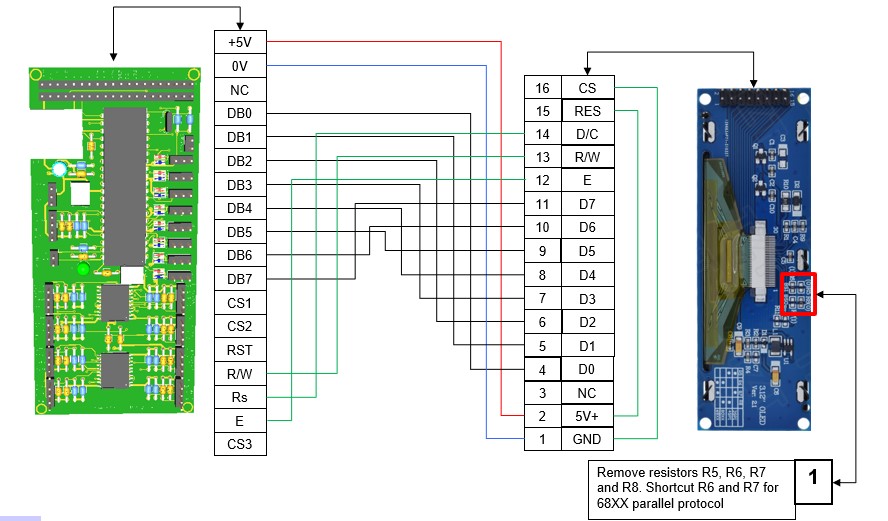
For connecting the display directly to the Main Board follow this wiring schematic:


Check that the display is configured for 6800 Parallel 8 bit interface. See note 1 in above picture.

You can power the board directly from the power supply separately from the signals cable: pins 1 and 2 of the display.

Before connecting the OLED display turn off the power supply of the Main Pcb and detach the USB cable from the computer.

Be sure you have firmware version 1.5.0 or higher (1.5.1 recommended) in the Main PCB. You can see your firmware version by clicking on Help/About in the PSCockpit Software)

Turn on power and connect the USB cable to your computer.

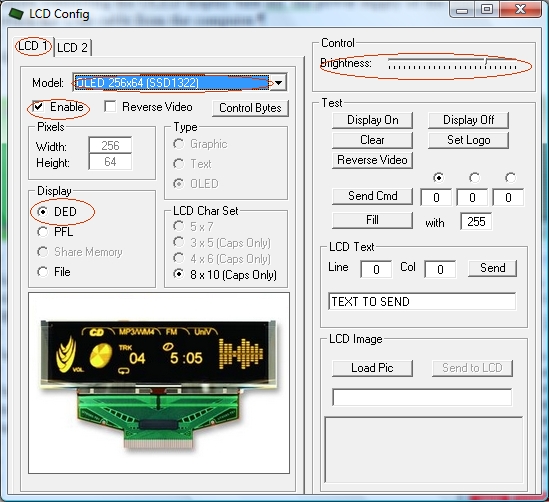
Run PSCockpit software and go to the LCD page and select the OLED display on the drop down list in the corresponding LCD tab. LCD 1 is used for the LCD connected to the most external connector of the Main Pcb and LCD 2 for the inner connector:


Don’t forget to check “Enable” and the “DED” or “PFL” to use with our sim and the desire brightness of the display with the slider bar.

In “Test” area you have some usual commands for you to try. They are self explanatory.

This display accepts 3 bytes commands. Select the corresponding option button above the commands text box to send one, two or three bytes.

You can also send monochrome bitmaps to the OLED but the horizontal length of the bitmap has to be multiple of 4.

NOTES:
* The OLED display is activated only when you enter PSCockpit software and is deactivated when you exit the program. This is to avoid image persistence on the OLED.

* The OLED display may be light sensitive. Caution should be taken to avoid exposure of this device to any light source during normal operation.

* The OLED display is not radiation protected.

PS Cockpit System F16 distribution file for Main and Displays&Gauges boards

  This is the distribution file for the F16 when using the Main and Displays&Gauges boards.


You can download the F16 Cockpit for Main and Displays&Gauges distribution file in pdf format at:

F16 Distribution File for Main and Displays&Gauges boards 

Regards,
Shep

Thursday, May 12, 2022

PSCockpit chips sourcing issues

Hi all,I’m working on your boards, but it’s being a hard work to source all the components of the boards because of the lack of chips around the world.

All the components and boards have been already ordered but the status some of the components are as follows:

PCA9505
Affecting the following boards: 40 I/O, ICP, Caution Panel, UHF, CMDS, TWP.
The supplier of the boards has found the chips and will send the affected boards by the end of May

MCP23017
Affecting the following boards: 16 I/O, TWA, X40, ELEC, AUDIO, TRIM.
The supplier will have them in stock by 30/05/2022 as stated in the web page.

PIC18F4550
Affecting the following boards: Main Board, Displays&Gauges boards.
The supplier will have them in stock by 30/05/2022 as stated in the web page.

Display OLED 256x64
Affecting the DED and PFD displays
The supplier will have them in stock by 26/12/2022 as stated in the web page.
I have ordered one different OLED display to make some trials for substitution

All Other components and boards are already in my hand and working on them.
In case of any further sourcing issues, I will contact you one by one to decide if you want separate shipments.

Thanks for you patient and support.
Shep
Saturday, January 22, 2022

Running PSCockpit and Helios in DCS

Edited on Dec, 2022:
====================================================================
Below files are obsolete. You can find the new .lua files in your PSCockpit v1.0.5 directory

Download .lua files from: https://www.mediafire.com/file/zzpop31qgx90gqu/PSCockpit+DCS+Export+Lua+Files.zip/file
====================================================================

1. Copy the following files to "\Users\@USER\Saved Games\DCS\Scripts\PSCockpit\" folder:
- PSCockpitExport.lua
- ExportPSCockpit-A10C.lua
- ExportPSCockpit-F16C-50.lua

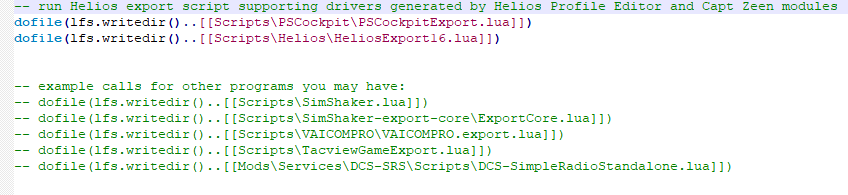
If you have already a Export.lua generated by Helios, add the following line before Helios do file line:

dofile(lfs.writedir()..[[Scripts\PSCockpit\PSCockpitExport.lua]])


If you don’t use Helios or do not have a Export.lua file copy file Export.lua to "\Users\@USER\Saved Games\DCS\Scripts\" folder

If there are no folders descripted above, create them

Regards,
Shep

Thursday, December 30, 2021

PSCockpit and PSCockpit Displays&Gauges Systems 11th Run!!!

Time to launch a new run of the PSCockpit System!!
Those of you who don’t know yet how this system can handle, please read the following links
PSCockpit System: PS Tools: PSCockpit 9th Run (psfalcon.blogspot.com)

PSCockpit Displays and Gauges: PS Tools: Displays & Gauges (psfalcon.blogspot.com)

More information, downloads and guides at:
PS Tools: PSCockpit System Up to Date Software, Firmware, Guides and Boards (psfalcon.blogspot.com)

This run features the new Trim and Trim Indicator pcbs:

Time to launch a new run of the PSCockpit System!!

Those of you who don’t know yet how this system can handle, please read the following links
PSCockpit System: https://psfalcon.blogspot.com/2020/01/pscockpit-9th-run.html

PSCockpit Displays and Gauges: https://psfalcon.blogspot.com/search/label/Displays%20%26%20Gauges

More information, downloads and guides at:
https://psfalcon.blogspot.com/2015/05/pscockpit-system-up-to-date-software.html

This run features the new Trim and Trim Indicator pcbs:


More info about these boards to follow.


PSCockpit System Prices:
The prices of the PCB’s already mounted and tested are the following:
- Main PCB: 60 €
- Digital expander for 40 inputs/outputs: 33 €
- Digital expander 16 inputs/outputs: 10 €
- Steppers/Other voltage outputs pcb: 28 €
- 7 segment displays pcb for 6 displays: 18 €
- Analogue pcb for 4 inputs/ 1 output: 20 €
- Yellow OLED display (85mm x 40mm), 256x64 for DED or PFL: 65 €
- I2CtoSPI pcb: 25€
- Aircore Controller pcb: 24€
- Aircore pcb: 15€
- Vibration motors pcb: 38€
- I/O Enhancement pcb: 6,5€
- Caution Panel board: 40€
- UHF board: 90€
- ICP pcb Rev 1: 90€
- CMDS board (with 2 rotary switches 30º & 45º, no toggles, no displays): 80€
- CMDS options:
- Miniature toggles 6 mm diam. (1 with locking lever): 50€
- SGL2016 displays Not available
- HDLG-1414 displays: 35€ (each)
- 7 segment displays pcb with 8 displays: 35€
- TWP board: 40€
- TWA board: 20€
- X40 stepper board: 20€
- PWM board: 20€
- ELEC board: 50€
- AUDIO1 & AUDIO2 board: 100€

New boards:
- TRIM board: 80€
- TRIM INDICATOR board: 15€

PSCockpit Displays&Gauges System Prices:
The prices of the PCB’s already mounted and tested are the following:
- Displays & Gauges pcb: 55€
- X27 stepper pcb: 15€
- Eyebrow lights pcb: 15€
- Indexer pcb: 15€
- Engine Gauges for Aircores with electronics for PSCockpit System pcb: 90€
- Engine Gauges for X27 or Aircores without electronics: 65€
- Hyd pcb: 15€

Other components by demand:
- Wire and connectors
- Engine Gauges, Eyebrow and Indexer panels
- Gauges panels
- Stepper motors X27
- Aircore Motors

- Shipments: 10€/ 18€ / 28€ depending on the total weight order and country


Time Line:
- Orders and payments will be accepted until Jan. 30th. 2022
- Only direct bank transfers. Sorry for the inconvenience.
- Delivery: Starting March 2022

Thanks everybody for your support and have a New Year,
Shep

Saturday, January 16, 2021

PSCockpit Displays & Gauges software V1.0.0

You can now download the new PS Cockpit Displays & Gauges Software V.1.0.0 to control and config your PS Cockpit Displays & Gauges pcb: Download

The software is ready for Falcon BMS 4.35 and DCS 2.5.6.

Do not forget to install and run this version with admin rights!

Enjoy!!

Shep

Wednesday, December 16, 2020

Displays and Gauges pcb's with Panels

Hi to all!

Here are some pictures of the new boards already mounted with panels thanks to Hispapanels:


Lettering of above panel to be corrected!


If somebody would like to have the panels shipped with the pcbs shipment, please contact me.

I have corrected some minor issues of the software and everything seems to be ok. Shipments will begin this week. Thanks all for your patient.

Regards,
Shep

Monday, November 30, 2020

10th Run Pcbs (2)

Engine Motors and Indexer pcbs have arrived :


Waiting for some components and the final tests of the software to begin shipments next week.
Please be patient for your turn.

Thanks all for your support!

Regards,
Shep

Monday, November 16, 2020

10th Run Pcbs (1)

Hi to all!

Displays&Gauges, X27, HYD and Eyebrow pcbs have arrived!!


Still waiting for the indexers and motor gauges pcbs to arrive.

Hopefully I will begin shipping in a couple of weeks.

Regards,
Shep

Wednesday, October 7, 2020

X27 and HYD PCBs

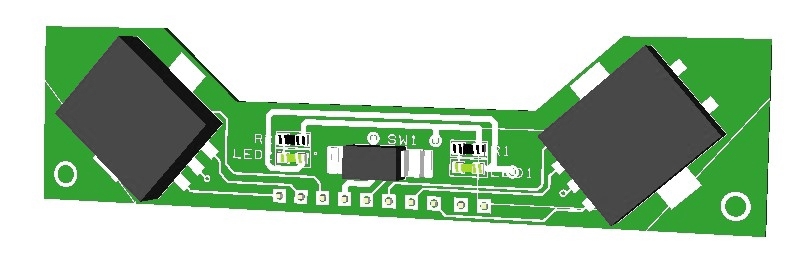
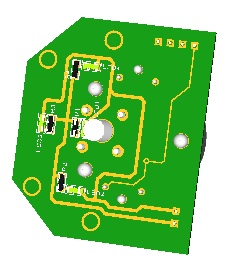
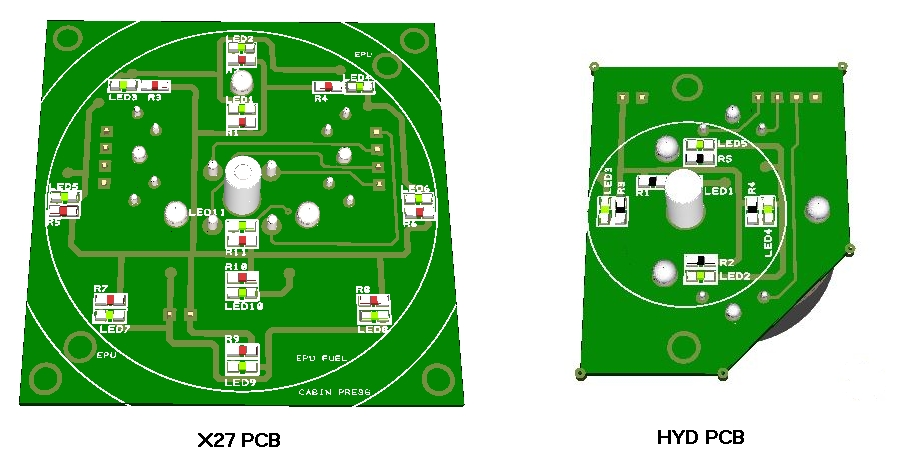
The X27 and HYD pcbs are designed to hold either X27 Stepper Motors or Aircore motors and they come with SMD leds and resistors for backlight.

The X27 pcb can be used for EPU Fuel, Cabin Press and Liquid Oxygen indicators of the F16 while the HYD pcbs can be used for HYD indicators of the F16.

Both pcbs has accessible pins for the motors so it can be used with PSCockpit System or with any other system.


You will find in the backside three connectors:
- (1) Connector for the X27 Stepper Motor/Aircore Motor
- (1) Connector for the backlight leds

To complete the gauges with the X27 and HYD pcbs you must add by yourself the scale plate, needle and gauge cover.

You can check the dimensions of the the X27 and HYD pcbs at:
https://psfalcon.blogspot.com/2020/01/pscockpit-9th-run.html

Regards,
Shep