Showing posts with label PS UDP. Show all posts

Wednesday, January 8, 2025

PSUdp Software V.1.0.3u5 Update for Falcon BMS 4.37U6 and DCS 2.9.1 with CPD


Change log:
PSUdp and CPD new version updated v1.0.3u5:
==============================
- Revised Shared Memory Area reader for BMS 437 U6
- Added new port to send BMS Kneeboard DDS or PNG pictures to view them in the CPD
- Added a MAP tool to generate airport maps from a .CAM BMS file to be used in the CPD
- Corrected the joystick buttons assignment in CPD joystick.
- PSGaugesV5u5: Added Kneeboard DDS textures.


You can download the installation file v1.0.3 u5 here:
https://www.mediafire.com/file/h85fp6f96czihf2/PSUdpV103u5Setup.zip/file

Do not forget to install and run this version with admin rights!

Installation notes:
- Unrar the file
- Install PS UDP in your computer with PSUdpV103u5SetUp.exe
- Install PSGaugesV5u5.apk in all your favorite android devices
- Read HelpV103.txt!!
- Enjoy

Regards,
Shep

Sunday, September 1, 2024

PSUdp Software V.1.0.3u4 Update for Falcon BMS 4.37U3 and DCS 2.9.1 with CPD


PS UDP extracts the flight data from Falcon BMS and DCS simulators acting like a server and send the data to an android mobile device running the client application PSGaugesV5 trough the TCP/UDP net protocol.

It can be used as standalone application to render the CPD in one of your PC monitor.

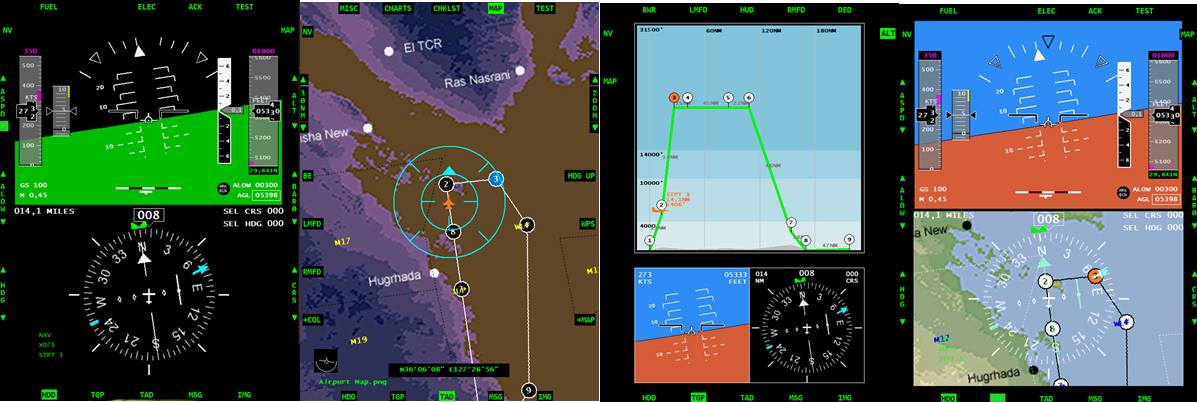
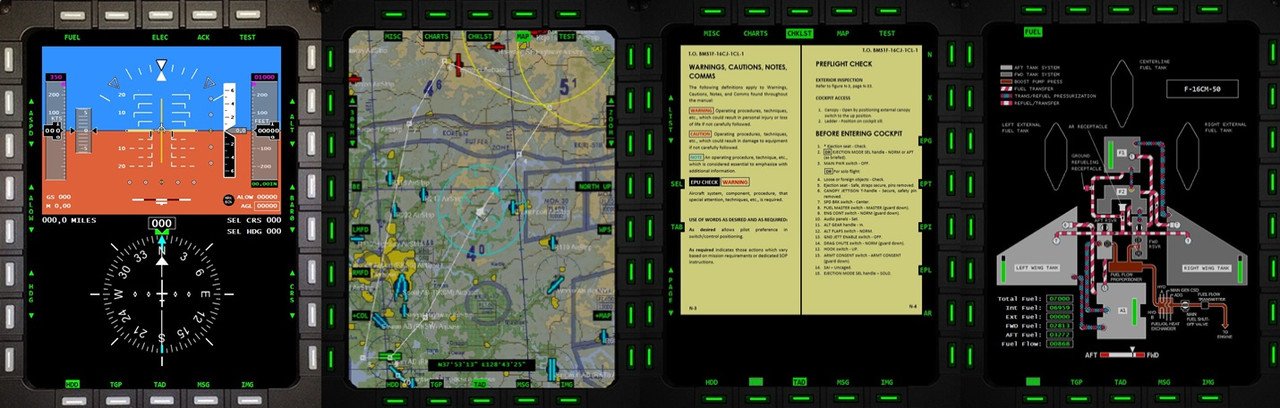
CPD features:
- HSI
- ADI
- Fuel data
- Checklists
- Terrain Maps
- Airport charts
- Miscellaneous documents (kneeboard)
- Maps, airport charts and miscellaneous documents can be added and customize by adding files to the respective directories.

PS UDP supports 10 clients connected at the same time so you can use ten different android devices. Five of them are used for flight data. The other five are used to export views: one for the left MFD, one for the right MFD, one for the HUD, one for RWR and one for HMS.

PSGaugesV5 client application can be used from Android 4.0 to Android 14.

PSGaugesV5 can render on your Android device the following instruments of the F16: RPM, RWR, HSI, DED, PFL, ADI, VVI, AOA, ASI, ALT, COMPASS, CP, FFI, Fuel Indicator, ICP, LMFD, HUD, RMFD, CLOCK, HMS, EHSI and CPD.

Change log:
PSUdp V.1.0.3 u4 -- PSGauges V5u4
============================
- Fixed error on DCS data
- Fixed error on map reading on CPD
- Fixed error on TGP readings (LMFD, RMFD, HUD, DED)
- Added DED texture reading in UDP SM Read
- Added Main Screen Export coordinates form
- Fixed error "Window not active" when sending commands
- Fixed error in DCS F-16 clock time
- PSGaugesV5u4: fixed error in Clock 

Change log:
PSUdp V.1.0.3 u3 -- PSGauges V5
============================
- PSUdp: PSCockpit Shared Memory reader added
- PSUdp: Data extraction from DCS via UDP port
- CPD: Added nightvision ADI and MAP
- CPD: Added MAP background on HSI
- CPD: Added altitud map

Change log:
PSUdp V.1.0.3 u1 -- PSGauges V5
============================
- PSUdp: Joystick corrected
- PSUdp: CPD render improved
- PSUdp: Upgraded DCS Export for DCS 2.9.1
- PSUdp: Added EHSI values
- PSUdp: Added CPD values
- PSUdp: BMS .key file reader and drag&drop function to assign keys
- PSUdp: Added PSCockpit Share Memory Area (PSCockpitSharedMemoryArea)

- PSGauges: Corrected ADI
- PSGauges: Added RWR export Client from the shared memory
- PSGauges: Added EHSI instrument
- PSGauges: Added CPD panel

You can download the installation file here: Download

Do not forget to install and run this version with admin rights!

Installation notes:
- Unrar the file
- Install PS UDP in your computer with PSUdpV103u4SetUp.exe
- Install PSGaugesV5u4.apk in all your favorite android devices
- Read HelpV103.txt!!
- Enjoy

Note on DCS: CPD, HSI and EHSI do not extract bearing to beacon and desired heading values.

Regards,
Shep

Sunday, June 16, 2024

PSUdp Software V.1.0.3u3 Update for Falcon BMS 4.37U3 and DCS 2.9.1 with CPD


PS UDP extracts the flight data from Falcon BMS and DCS simulators acting like a server and send the data to an android mobile device running the client application PSGaugesV5 trough the TCP/UDP net protocol.

It can be used as standalone application to render the CPD in one of your PC monitor.

CPD features:
- HSI
- ADI
- Fuel data
- Checklists
- Terrain Maps
- Airport charts
- Miscellaneous documents (kneeboard)
- Maps, airport charts and miscellaneous documents can be added and customize by adding files to the respective directories.

PS UDP supports 10 clients connected at the same time so you can use ten different android devices. Five of them are used for flight data. The other five are used to export views: one for the left MFD, one for the right MFD, one for the HUD, one for RWR and one for HMS.

PSGaugesV5 client application can be used from Android 4.0 to Android 14.

PSGaugesV5 can render on your Android device the following instruments of the F16: RPM, RWR, HSI, DED, PFL, ADI, VVI, AOA, ASI, ALT, COMPASS, CP, FFI, Fuel Indicator, ICP, LMFD, HUD, RMFD, CLOCK, HMS, EHSI and CPD.

Change log:
PSUdp V.1.0.3 u3 -- PSGauges V5
============================
- PSUdp: PSCockpit Shared Memory reader added
- PSUdp: Data extraction from DCS via UDP port
- CPD: Added nightvision ADI and MAP
- CPD: Added MAP background on HSI
- CPD: Added altitud map

Change log:
PSUdp V.1.0.3 u1 -- PSGauges V5
============================
- PSUdp: Joystick corrected
- PSUdp: CPD render improved
- PSUdp: Upgraded DCS Export for DCS 2.9.1
- PSUdp: Added EHSI values
- PSUdp: Added CPD values
- PSUdp: BMS .key file reader and drag&drop function to assign keys
- PSUdp: Added PSCockpit Share Memory Area (PSCockpitSharedMemoryArea)

- PSGauges: Corrected ADI
- PSGauges: Added RWR export Client from the shared memory
- PSGauges: Added EHSI instrument
- PSGauges: Added CPD panel

You can download the installation file here: Download

Do not forget to install and run this version with admin rights!

Installation notes:
- Unrar the file
- Install PS UDP in your computer with PSUdpV103SetUp.exe
- Install PSGaugesV5.apk in all your favorite android devices
- Read HelpV103.txt!!
- Enjoy

Note on DCS: CPD, HSI and EHSI do not extract bearing to beacon and desired heading values.

Regards,
Shep

Saturday, April 27, 2024

PSUdp Software V.1.0.3 Update for Falcon BMS 4.37U3 and DCS 2.9.1 with CPD


PS UDP extracts the flight data from Falcon BMS and DCS simulators acting like a server and send the data to an android mobile device running the client application PSGaugesV5 trough the TCP/UDP net protocol.

It can be used as standalone application to render the CPD in one of your PC monitor.

CPD features:
- HSI
- ADI
- Fuel data
- Checklists
- Terrain Maps
- Airport charts
- Miscellaneous documents (kneeboard)
- Maps, airport charts and miscellaneous documents can be added and customize by adding files to the respective directories.

PS UDP supports 10 clients connected at the same time so you can use ten different android devices. Five of them are used for flight data. The other five are used to export views: one for the left MFD, one for the right MFD, one for the HUD, one for RWR and one for HMS.

PSGaugesV5 client application can be used from Android 4.0 to Android 14.

PSGaugesV5 can render on your Android device the following instruments of the F16: RPM, RWR, HSI, DED, PFL, ADI, VVI, AOA, ASI, ALT, COMPASS, CP, FFI, Fuel Indicator, ICP, LMFD, HUD, RMFD, CLOCK, HMS, EHSI and CPD.

Change log:
PSUdp V.1.0.3 u1 -- PSGauges V5
============================
- PSUdp: Joystick corrected
- PSUdp: CPD render improved
- PSUdp: Upgraded DCS Export for DCS 2.9.1
- PSUdp: Added EHSI values
- PSUdp: Added CPD values
- PSUdp: BMS .key file reader and drag&drop function to assign keys
- PSUdp: Added PSCockpit Share Memory Area (PSCockpitSharedMemoryArea)

- PSGauges: Corrected ADI
- PSGauges: Added RWR export Client from the shared memory
- PSGauges: Added EHSI instrument
- PSGauges: Added CPD panel

You can download the installation file here: Download

Do not forget to install and run this version with admin rights!

Installation notes:
- Unrar the file
- Install PS UDP in your computer with PSUdpV103SetUp.exe
- Install PSGaugesV5.apk in all your favorite android devices
- Read HelpV103.txt!!
- Enjoy

Note on DCS: CPD, HSI and EHSI do not extract bearing to beacon and desired heading values.

Regards,
Shep

Saturday, January 16, 2021

PSUdp Software V.1.0.2 Update for Falcon BMS 4.35 and DCS 2.5.6

 This application extracts the flight data from Open Falcon, Falcon AF, Falcon BMS and DCS simulators acting like a server and send this data to an android mobile device running the client application PSGauges V3 trough the TCP/UDP net protocol.

You can also export the data to one of your PC monitors.

PS UDP Falcon supports 10 clients connected at the same time so you can use five different android devices. Five of them are used for flight data. The other five are used to export views: one for the left MFD, one for the right MFD, one for the HUD, one for RWR and one for HMS.

You can customize your Export Views for different sims

PSGaugesV3 client application needs Android 4.0
 
Change log:
 
PSUdp V.1.0.2
- Help updated for BMS 4.35 Extraction
- Shared Memory updated for BMS 4.35
- Export file updated for DCS 2.5.6
- Added Codejock libraires in the Setup.exe
- RTT Export updated for BMS 4.35
- Const iFirmwareVersion = 10601 to force generating DEDInvert in LuaExportDCS
- FD.FTIT now not depending on RPM
- FD2.AAUZ substitute FD.ShipDown in FalconBMS for correct reading of the Altimeter
- Option to control the Instrument lights by the sim

 You can download the installation file here: Download

Do not forget to install and run this version with admin rights!

Installation notes:
- Unrar the file
- Install PS UDP in your computer with PSUdpV102SetUp.exe
- Install PSGaugesV3.apk in all your favorite android devices
- Read HelpV102.txt!!
- Enjoy

Regards,
Shep

Saturday, March 11, 2017

New Versions of PSUdp and PSGauges for Android 4.0

This application extracts the flight data from Open Falcon, Falcon AF, Falcon BMS and DCS simulators acting like a server and send this data to an android mobile device running the client application PSGauges V3 trough the TCP/UDP net protocol.

PS UDP Falcon supports 10 clients connected at the same time so you can use five different android devices. Five of them are used for flight data. The other five are used to export views: one for the left MFD, one for the right MFD, one for the HUD, one for RWR and one for HMS.

You can customize your Export Views for different sims

PSGaugesV3 client application needs Android 4.0
 
Change log:
 
PSUdp V.1.0
- Added windows export to the same computer running the application.
- LuaExportDCS updated to DCS 1.5.5
- BMS Falcon Shared Memory updated to BMS 4.33 U3
- Keybindings can be accessed now from the UI
- Compatibility with old versions of PSGauges
- Added JPG compress for each device
- Number of Android devices increased to five
- Added RWR and HMS export views
- Added configuration for other sims.


PSGAUGES V.3
- Added HMS and  RWR clients
- Added new pictures of gauges
- Added "No title bar" option
- Added flood lights
- Altimeter corrected


 You can download the installation file here: PSUdpV10

Installation notes:
- Unrar the file
- Install PS UDP in your computer with PSUdpSetUp.exe
- Install PSGaugesV3.apk in all your favorite android devices
- Read HelpV10.txt!!
- Enjoy

Regards,
Shep

Saturday, January 4, 2014

New Version of PSUDP Updated for Android 4.0

PSUdp extracts the flight data from Open Falcon, Falcon AF and Falcon BMS flight simulators acting like a server and send this data to an android mobile device running the client application PS Gauges trough the TCP/UDP net protocol.
PS UDP Falcon supports 5 clients connected at the same time so you can use five different android devices. Three of them are used for flight data, one for the left MFD, one for the right MFD and one for the HUD.

PS Gauges client application needs Android 4.0

PS Gauges can display in your mobile device the following instruments: RPM, RWR, HSI, DED, PFL, ADI, VVI, AOA, ASI, ALT, CMPSS, CP, FFI, FI, ICP, LMFD, HUD and RMFD.
 
This new version has the following changes:
- Updated PSGauges.apk for Android 4.0
- Fixed the problem with the local IP address by using the WIFI IP address.
- Update for BMS 4.32 up 6.

You can download the installation file here: PSUDPv09

Installation notes:
- Unrar the file
- Install PS UDP in your computer with PSUdpSetUp.exe
- Install PSGauges.apk in all your favorite android devices
- Read HelpV09.txt!!
- Enjoy

Regards,
Shep

Monday, October 22, 2012

New PS UDP Setup File

For the ones who are having problems installing PS UDP in your computer, specially Windows 7 users, I have improved the installation Setup program. Hope it helps!

You can download all the files for PSUDP here: PSUDP

Installation notes:
- Unrar the file
- Install PS UDP in your computer with PSUdpSetUp.exe
- Install PSGauges.apk in all your favorite android devices
- Enjoy

Regards,
Shep

Monday, April 23, 2012

PS Gauges Update

Hi everyone,

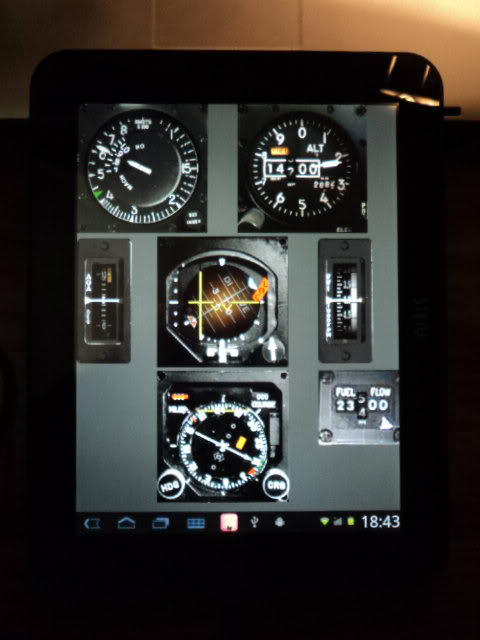
Got my Airis OnePad 970 yesterday!!! Yihaw !

Here is a picture with the center console gauges with PSUdp software:


I made a little update on PSGauges to fix a display problem regarding the different dip of the device.
You can download it here: Update

Regards,
Shep

Saturday, October 15, 2011

PS UDP Falcon Server for Android 2.2 (v0.8)(Beta)


This application extracts the flight data from Open Falcon, Falcon AF and Falcon BMS flight simulators acting like a server and send this data to an android mobile device running the client application PS Gauges trough the TCP/UDP net protocol.

PS UDP Falcon supports 5 clients connected at the same time so you can use five different android devices. Three of them are used for flight data, one for the left MFD, one for the right MFD and one for the HUD.

PS Gauges client application needs Android 2.2

PS Gauges can display in your mobile device the following instruments: RPM, RWR, HSI, DED, PFL, ADI, VVI, AOA, ASI, ALT, CMPSS, CP, FFI, FI, ICP, LMFD, HUD and RMFD.

Download

Installation notes:
- Unrar the file
- Install PS UDP in your computer with PSUdpSetUp.exe
- Install PSGauges.apk in all your favorite android devices

Enjoy it!!!

Please post your comments and suggestions to keep improving the application.

Regards,
Shep