Sunday, March 1, 2026

PSCockpit 2026 Run

Time to launch a new year run of the PSCockpit System!!Those of you who don’t know yet how this system, please read the following links:

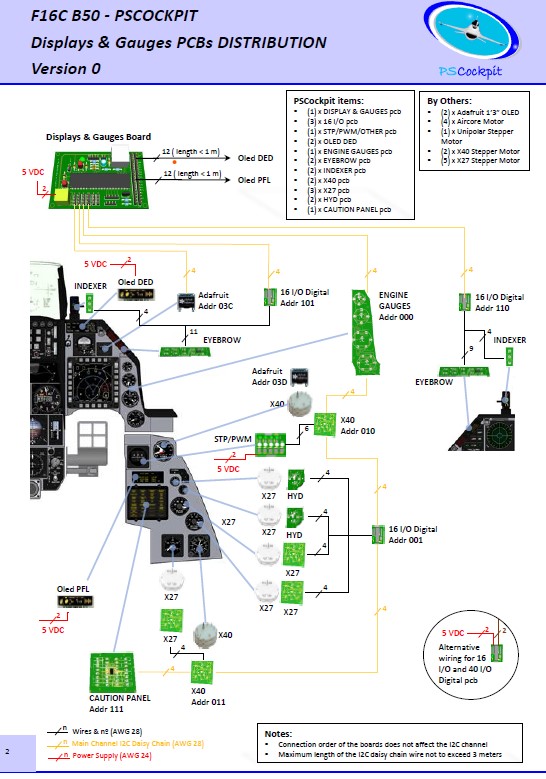
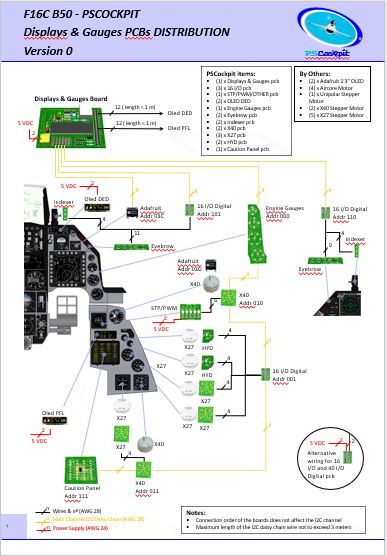
PS Cockpit System F16 distribution file for Main and Displays&Gauges boards: https://psfalcon.blogspot.com/2026/03/f16c-b50-pscockpit-pcbs-distribution.html

PSCockpit System: https://psfalcon.blogspot.com/2025/01/ps-cockpit-system-description.html

PSCockpit Displays and Gauges: https://psfalcon.blogspot.com/2025/01/pscockpit-displays-gauges-system.html

More information, downloads and guides at:
https://psfalcon.blogspot.com/2015/05/pscockpit-system-up-to-date-software.html

This Run features these new items:
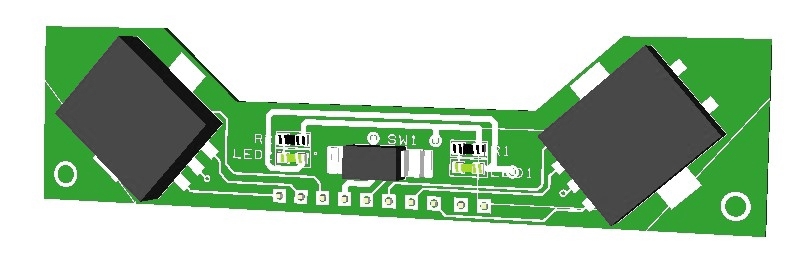
• AUXCOMM pcb (100€)


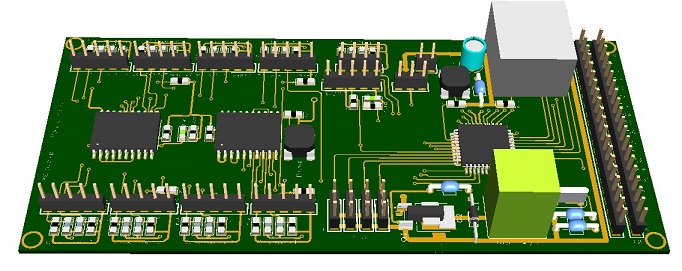
The AUXCOMM board comes with the following elements:
- (1) 40 I/O chip to be connected to the digital I/O I2C channel of the PSCockpit system and its elements (resistors, connectors, …) to work with 5V to drive the elements of the panel.
- (3) Toggle switches ON-OFF-ON for IFF REPLY, T/R and M4-Code.
- (1) Toggle switch ON-OFF for Monitor Audio.
- (8 ) Pushbuttons for Channel Selection.
- (1) OLED display for Channel Digits
- (1) PLA printed set of pieces to emulate Digilever channel selectors
- (20) SMD leds for lettering backlight.
- (18) Free digital I/Os

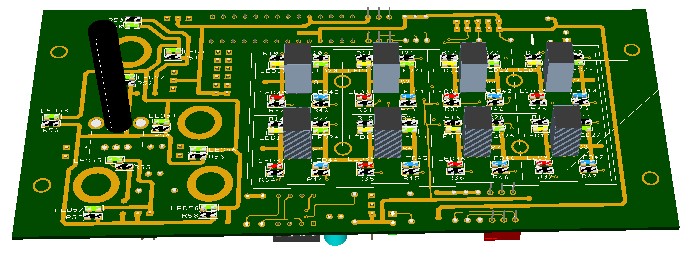
You will find the following elements in the backside:
- (1) Connector for backlight illumination.
- (2) Connectors for digital I/O I2C channel.
- (2) Mini-switch to select 16I/O and 40I/O chips I2C channel addresses.
- (1) Connector for free digital I/Os.

You can use the free I/Os to connect your real Digilever channel selectors. In this case the PCB will be sent with no OLED display nor PLA printed set for a price of 60€.

To complete the AUXCOMM panel, you will need to add the following elements:
- AUXCOMM front panel
- AUXCOMM knobs

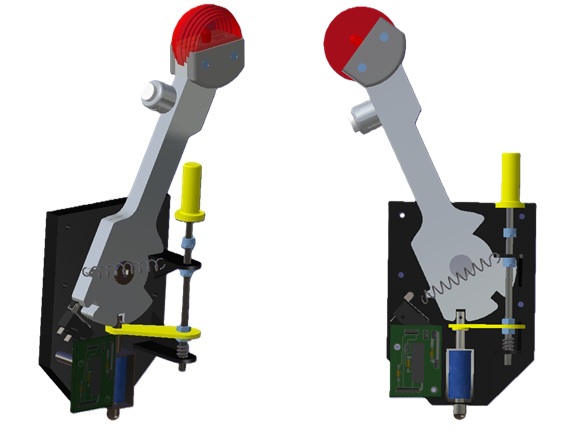
• Seat Ejection Handle (15€)
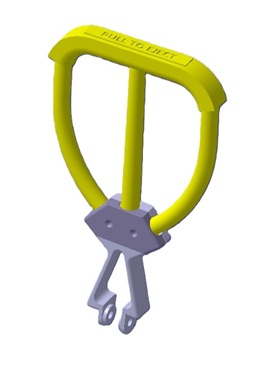


3D printed in grey PLA (base) and yellow flexible TPU (handle).

PSCockpit System Prices:
The prices of PCB’s already mounted and tested are the following:
- Main Board V2 PCB: 80€
- Digital expander for 40 inputs/outputs: 33 €
- Digital expander 16 inputs/outputs: 10 €
- Steppers/Other voltage outputs pcb: 28 €
- 7 segment displays pcb for 6 displays: 18 €
- Analogue pcb for 4 inputs/ 1 output: 20 €
- I2CtoSPI pcb: 25€
- Aircore Controller pcb: 24€
- Aircore pcb: 15€
- Vibration motors pcb: 38€
- I/O Enhancement pcb: 6,5€
- Caution Panel board: 40€
- UHF board: 90€
- ICP pcb Rev 1: 90€
- CMDS board (with 2 rotary switches 30º & 45º, no toggles, no displays): 80€
- CMDS options:
- Miniature toggles 6 mm diam. (1 with locking lever): 50€
- SGL2016 displays Not available
- HDLG-1414 displays: At market price
- 7 segment displays pcb with 8 displays: 35€
- TWP board: 40€
- TWA board: 20€
- X40 stepper board: 20€
- PWM board: 20€
- ELEC board: 50€
- AUDIO1 & AUDIO2 board: 100€
- TRIM board: 80€
- TRIM INDICATOR board: 15€
- ECM pcb: 100 €
- CPD pcbs for one CPD: 90€
- EHSI pcb: 20 €

PSCockpit Displays&Gauges System Prices:
The prices of the PCB’s already mounted and tested are the following:
- Displays & Gauges pcb: 55€
- X27 stepper pcb: 15€
- Eyebrow lights pcb: 15€
- Indexer pcb: 15€
- Engine Gauges for Aircores with electronics for PSCockpit System pcb: 90€
- Engine Gauges for X27 or Aircores without electronics: 65€
- Hyd pcb: 15€

3D Printed Components:
- Gear Landing Set: 90€
- Canopy Spider Set: 20 €

- Shipments: 10€/ 18€ / 28€ depending on the total weight order and country

Time Line:
- Orders and payments will be accepted until March. 29th. 2026
- Only direct bank transfers. Sorry for the inconvenience.
- Delivery: From May 2026

Thanks everybody for your support.
Shep

F16C B50 PSCockpit PCBs Distribution Files Run 2026

 New F16 PSCockpit pcbs distribution for Run 2026 for Main Board and Main+Displays&Gauges boards.


You can download both distribution files in pdf format at:

F16 Distribution Files Run 2026

Regards,
Shep

Saturday, January 25, 2025

PSCockpit 2025 Run. Entering new world!

Time to launch a new run of the PSCockpit System!!

Those of you who don’t know yet how this system, please read the following links:

PS Cockpit System F16 distribution file for Main and Displays&Gauges boards: https://psfalcon.blogspot.com/2022/08/ps-cockpit-system-f16-distribution-file_17.html

PSCockpit System: PS Tools: https://psfalcon.blogspot.com/2025/01/ps-cockpit-system-description.html

PSCockpit Displays and Gauges: https://psfalcon.blogspot.com/2025/01/pscockpit-displays-gauges-system.html

More information, downloads and guides at:
https://psfalcon.blogspot.com/2015/05/pscockpit-system-up-to-date-software.html

This run features these new items:
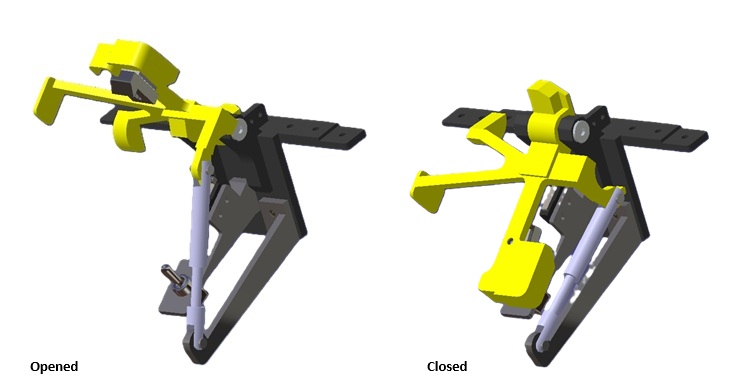
Gear Landing Set


Canopy spider Set


Both sets 3D printed in PLA and come with their necessary elements (springs, switches, limit switches, 12V coil, pcb, for correct operation an interface with PSCockpit System or any other I/O system.
- Gear Landing Set: 90€
- Canopy Spider Set: 20 €


PSCockpit System Prices:
The prices of the PCB’s already mounted and tested are the following:
- Main Board V2 PCB: 80€
- Digital expander for 40 inputs/outputs: 33 €
- Digital expander 16 inputs/outputs: 10 €
- Steppers/Other voltage outputs pcb: 28 €
- 7 segment displays pcb for 6 displays: 18 €
- Analogue pcb for 4 inputs/ 1 output: 20 €
- Yellow OLED display (85mm x 40mm), 256x64 for DED or PFL: 65 €
- I2CtoSPI pcb: 25€
- Aircore Controller pcb: 24€
- Aircore pcb: 15€
- Vibration motors pcb: 38€
- I/O Enhancement pcb: 6,5€
- Caution Panel board: 40€
- UHF board: 90€
- ICP pcb Rev 1: 90€
- CMDS board (with 2 rotary switches 30º & 45º, no toggles, no displays): 80€
- CMDS options:
- Miniature toggles 6 mm diam. (1 with locking lever): 50€
- SGL2016 displays Not available
- HDLG-1414 displays: 35€ (each)
- 7 segment displays pcb with 8 displays: 35€
- TWP board: 40€
- TWA board: 20€
- X40 stepper board: 20€
- PWM board: 20€
- ELEC board: 50€
- AUDIO1 & AUDIO2 board: 100€
- TRIM board: 80€
- TRIM INDICATOR board: 15€
- ECM pcb: 100 €
- CPD pcbs for one CPD: 90€
- EHSI pcb: 20 €

PSCockpit Displays&Gauges System Prices:
The prices of the PCB’s already mounted and tested are the following:
- Displays & Gauges pcb: 55€
- X27 stepper pcb: 15€
- Eyebrow lights pcb: 15€
- Indexer pcb: 15€
- Engine Gauges for Aircores with electronics for PSCockpit System pcb: 90€
- Engine Gauges for X27 or Aircores without electronics: 65€
- Hyd pcb: 15€

Other components by demand:
- Engine Gauges, Eyebrow and Indexer panels
- Gauge panels
- Stepper motors X27
- Aircore Motors

- Shipments: 10€/ 18€ / 28€ depending on the total weight order and country

Time Line:
- Orders and payments will be accepted until Feb. 28th. 2025
- Only direct bank transfers. Sorry for the inconvenience.
- Delivery: From April 2025

Thanks everybody for your support.
Shep

PS Cockpit System Description

System Description

- One stop hardware and software for cockpit systems. Once the cockpit is connected you can configure the software individually for each sim.
- Easy configuration and setup for people without electronic knowledge.
- Avoid excessive wiring runs along the cockpit.

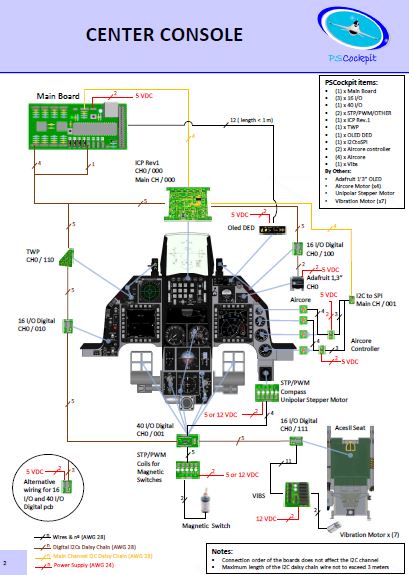
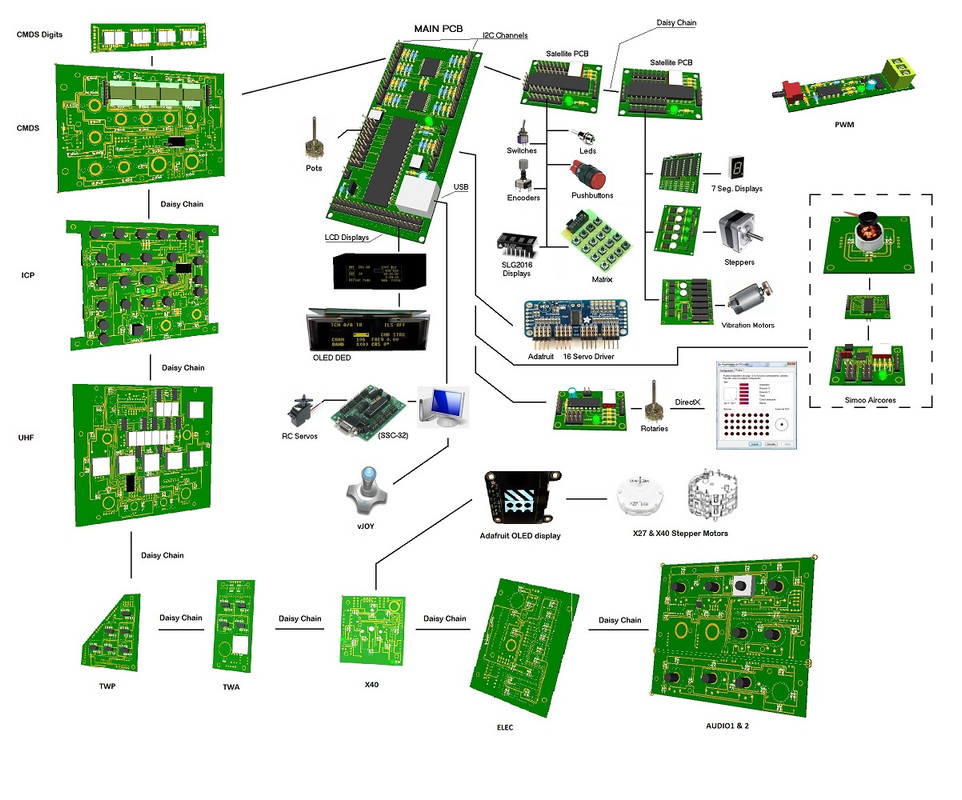
The system uses small satellite PCB’s that can be distributed along the cockpit. The communication between these satellite PCB’s and the Main PCB is done with only 2 wires (I2C protocol) plus the power cables. These wires can be connected in daisy chain. The idea is to wire each of the cockpit panels to only one satellite PCB. See F16 distribution example:


You can download at: Link

Supported devices
-   Digital inputs: Pushbuttons, 2 position switches, 3 position switches, digital encoders, BCD encoding (8 to 3, 16 to 4, 32 to 5) and 8x4 matrixes
-   Digital outputs and leds
-   Analogue inputs and outputs
-   Vibration motors
-   Aircores motors
-   Stepper motors: Unipolar, X27 and X40
-   RC Servomotors
-   Segment Displays: 7 segments and SLG2016
-   LCD displays: SSD1322 Graphic display 264x64, KS0108 Graphic display 128 x 64, KS0108B Text display 20x4, SSD1306 Adafruit 128x64 (ID938 and ID931)


More information, downloads and guides at http://psfalcon.blogspot.com.es/2015/05/pscockpit-system-up-to-date-software.html

Regards,
Shep

PSCockpit Displays & Gauges System Description

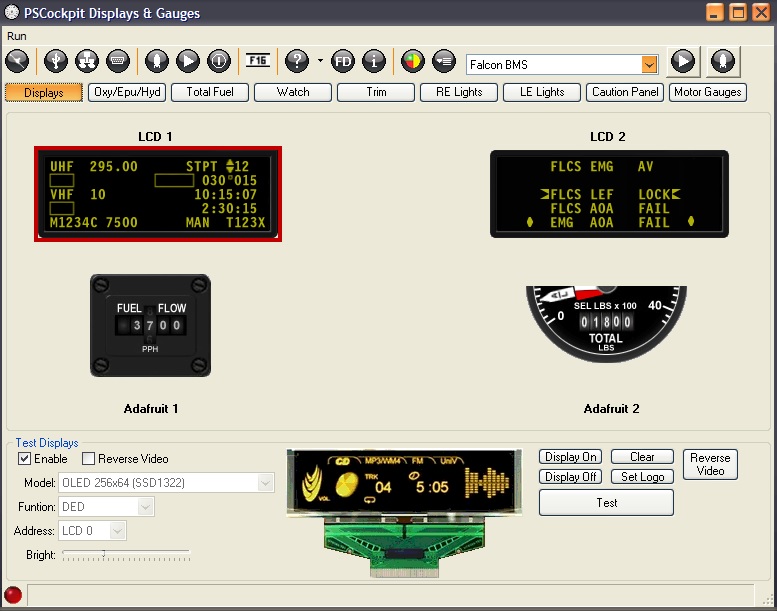
This PSCockpit Displays & Gauges System PCB drives the gauges and displays of the F16 pit reducing the load of the PSCockpit Main Board by reducing its processing time.

The Displays & Gauges Board is already configured giving a plug&play solution for people with less electronic knowledge.

PSCockpit users can use the same PSCockpit boards they already have in their pit and/or redistribute the boards between both systems PSCockpit Main Board and PSCockpit Displays & Gauges Board.

The modular concept of the Displays & Gauges Board allows users to select the displays and gauges they want to drive in their pit, adding other elements at any time.

For desktop pits or mini-pits users the Displays & Gauges Board can drive eyebrow lights, indexer lights and some other lights of the F16 Center console.


The Displays & Gauges Board is able to drive the following elements of the F16 pit:
- (2) x PSCockpit OLED displays for DED and PFL displays.
- (2) x Adafruit Monochrome OLED displays for Fuel Flow and Total Fuel indicators
- (14) x Stepper motors X40 or X27 for LIQ OXY, EPU Fuel, HYDA, HYDB, Total Fuel, Watch, Cabin Pressure, Roll Trim, Pitch Trim, Oxy Press, Speed Brake and Compass (with Unipolar Stepper Motor) gauges
- (4) x Aircore motors for Oil Pressure, Nozzle Pos, RPM and FTIT engine gauges.
- (2) x PSCockpit 16I/O boards for Eyebrow Lights, NWS and AOA lights, LG lights
- (1) x PSCockpit Caution Panel board.

The Displays & Gauges Board distribution for the F16 is the following:


You can download the F16 Displays & Gauges Distribution here: http://www.mediafire.com/file/j5p0gxo393t04q5/file

The Displays & Gauges Board has its own standalone software for Falcon BMS and DCS sims:


For new users, the Displays & Gauges Board, depending on your needs, can be completed with the following PSCockpit items:
- DED display: (1) PSCockpit OLED display
- PFL display: (1) PSCockpit OLED display
- Total Fuel Indicator: (1) PSCockpit X40 pcb + Adafruit display + X40 stepper motor
- Watch: (1) PSCockpit X40 pcb + Adafruit display + X40 stepper motor
- LIQ OXY, EPU Fuel, HYDA and HYDB gauges: (1) PSCockpit 16 I/O pcb + (4) PSCockpit X27 pcb + (4) X27 stepper motor
- Roll Trim, Pitch Trim, Oxy Press, Speed Brake gauges: (1) PSCockpit 16 I/O pcb + (4) PSCockpit X27 pcb + (4) X27 stepper motor
- Right Eyebrow and NWS lights: (1) PSCockpit 16 I/O pcb
- Left Eyebrow, AOA and LG lights: (1) PSCockpit 16 I/O pcb
- Caution Panel: (1) PSCockpit Caution Panel pcb
- Engine gauges: (1) PSCockpit Engine Motors pcb + (4) Aircore motors

You can find more info about PSCockpit system here:
http://psfalcon.blogspot.com.es/2015/05/pscockpit-system-up-to-date-software.html

Regards,
Shep

Wednesday, January 8, 2025

New version of PSCockpit software V1.0.6U2


New version of PSCockpit software V1.0.6U2 with Smart Lights controller:https://www.mediafire.com/file/fly8ouwsukvsyl5/PSCockpitV106U2Setup.zip/file

CHANGELOG V 1.0.6 U2
- Extended log file
- Corrected strip management on the Adafruit display.
- New option to read Sunrise y Sunset times from Briefing page.
- New Elapsed times table in USB settings.
- Corrected error in RUN mode when stopping PSCockpit.
- Shared Memory Area reader updated for BMS 4.37 U6
- Corrected stepper form error when no steppers are selected in the Airplane model
- New access to stepper configuration from the Main Page

Regards,
Shep

PSUdp Software V.1.0.3u5 Update for Falcon BMS 4.37U6 and DCS 2.9.1 with CPD


Change log:
PSUdp and CPD new version updated v1.0.3u5:
==============================
- Revised Shared Memory Area reader for BMS 437 U6
- Added new port to send BMS Kneeboard DDS or PNG pictures to view them in the CPD
- Added a MAP tool to generate airport maps from a .CAM BMS file to be used in the CPD
- Corrected the joystick buttons assignment in CPD joystick.
- PSGaugesV5u5: Added Kneeboard DDS textures.


You can download the installation file v1.0.3 u5 here:
https://www.mediafire.com/file/h85fp6f96czihf2/PSUdpV103u5Setup.zip/file

Do not forget to install and run this version with admin rights!

Installation notes:
- Unrar the file
- Install PS UDP in your computer with PSUdpV103u5SetUp.exe
- Install PSGaugesV5u5.apk in all your favorite android devices
- Read HelpV103.txt!!
- Enjoy

Regards,
Shep

Sunday, September 1, 2024

PSUdp Software V.1.0.3u4 Update for Falcon BMS 4.37U3 and DCS 2.9.1 with CPD


PS UDP extracts the flight data from Falcon BMS and DCS simulators acting like a server and send the data to an android mobile device running the client application PSGaugesV5 trough the TCP/UDP net protocol.

It can be used as standalone application to render the CPD in one of your PC monitor.

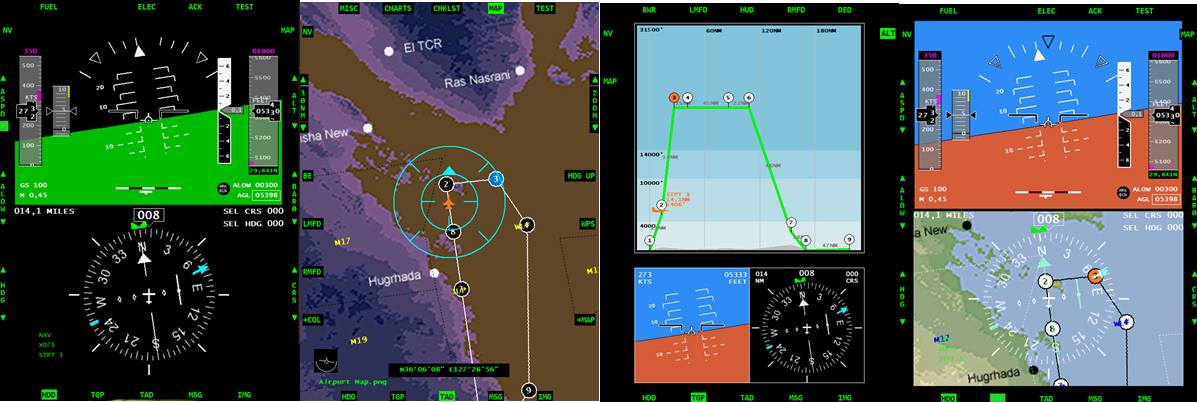
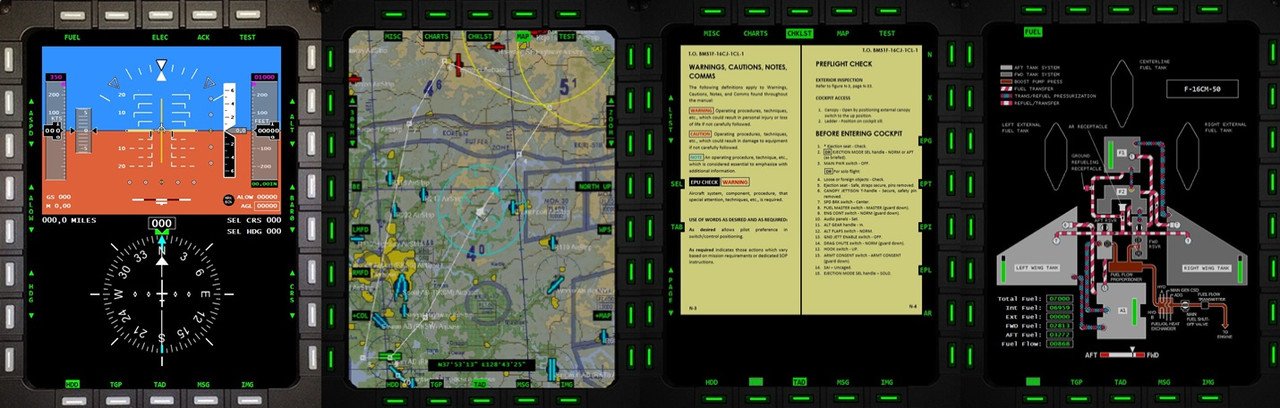
CPD features:
- HSI
- ADI
- Fuel data
- Checklists
- Terrain Maps
- Airport charts
- Miscellaneous documents (kneeboard)
- Maps, airport charts and miscellaneous documents can be added and customize by adding files to the respective directories.

PS UDP supports 10 clients connected at the same time so you can use ten different android devices. Five of them are used for flight data. The other five are used to export views: one for the left MFD, one for the right MFD, one for the HUD, one for RWR and one for HMS.

PSGaugesV5 client application can be used from Android 4.0 to Android 14.

PSGaugesV5 can render on your Android device the following instruments of the F16: RPM, RWR, HSI, DED, PFL, ADI, VVI, AOA, ASI, ALT, COMPASS, CP, FFI, Fuel Indicator, ICP, LMFD, HUD, RMFD, CLOCK, HMS, EHSI and CPD.

Change log:
PSUdp V.1.0.3 u4 -- PSGauges V5u4
============================
- Fixed error on DCS data
- Fixed error on map reading on CPD
- Fixed error on TGP readings (LMFD, RMFD, HUD, DED)
- Added DED texture reading in UDP SM Read
- Added Main Screen Export coordinates form
- Fixed error "Window not active" when sending commands
- Fixed error in DCS F-16 clock time
- PSGaugesV5u4: fixed error in Clock 

Change log:
PSUdp V.1.0.3 u3 -- PSGauges V5
============================
- PSUdp: PSCockpit Shared Memory reader added
- PSUdp: Data extraction from DCS via UDP port
- CPD: Added nightvision ADI and MAP
- CPD: Added MAP background on HSI
- CPD: Added altitud map

Change log:
PSUdp V.1.0.3 u1 -- PSGauges V5
============================
- PSUdp: Joystick corrected
- PSUdp: CPD render improved
- PSUdp: Upgraded DCS Export for DCS 2.9.1
- PSUdp: Added EHSI values
- PSUdp: Added CPD values
- PSUdp: BMS .key file reader and drag&drop function to assign keys
- PSUdp: Added PSCockpit Share Memory Area (PSCockpitSharedMemoryArea)

- PSGauges: Corrected ADI
- PSGauges: Added RWR export Client from the shared memory
- PSGauges: Added EHSI instrument
- PSGauges: Added CPD panel

You can download the installation file here: Download

Do not forget to install and run this version with admin rights!

Installation notes:
- Unrar the file
- Install PS UDP in your computer with PSUdpV103u4SetUp.exe
- Install PSGaugesV5u4.apk in all your favorite android devices
- Read HelpV103.txt!!
- Enjoy

Note on DCS: CPD, HSI and EHSI do not extract bearing to beacon and desired heading values.

Regards,
Shep

PSCockpit V1.0.6u1 Software Update with Smart Lights Controller


The new version V.1.0.6U1 auto installable version of the PS Cockpit Software is available for download!!Do not forget to install and run this version with admin rights!

New version of PSCockpit software V1.0.6U1 with Smart Lights controller: Download

CHANGELOG V 1.0.6 U1
- Engine OIL, RPM, FTIT and NOZZLE values added to stepper motors (Airplane model).
- New stepper page to include scales for non uniform gauges (Steppers).
- Added CMDS option to LCD diplays (LCD)
- Fixed a bug in DCS clock time
- Added Smart Lights controller (Smart Lights)


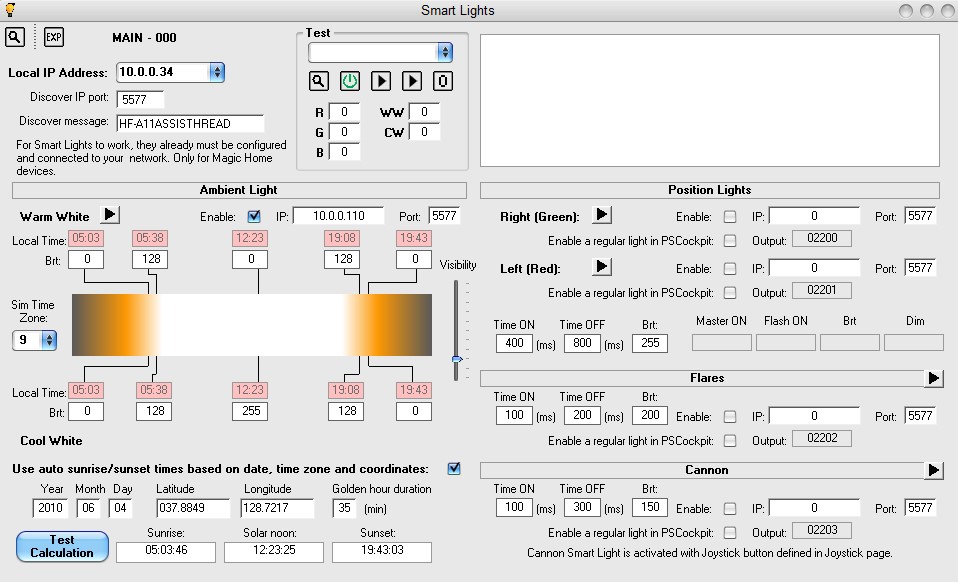
The above page of PSCockpit software allows you to control your home Smart Lights for several uses with BMS and DCS (Ambient Light, Position Lights, Flares and Cannon) causing the effect of seeing lights reflections on your cockpit when using the VR Mixed Reality Cockpit Cover passthrough.

Be aware that the controller can be used only with smart lights using Magic Home set of commands. Smart lights using Tuya, Fitop or similar applications are not valid. For your information, the smart light I have used for testing is the following: https://www.amazon.es/dp/B0CGWJ83WQ?ref=ppx_yo2ov_dt_b_fed_asin_title&th=1

AMBIENT LIGHT

The Ambient Light purpose is to emulate the sun light during your flight and can be configured to be used with fixed times of sunrise, sun noon and sunset and the ratio of cool white and warm light at any time to create the sunrise/sunset effects and golden hours.

For these effects to happen you will need to read the local times of your mission and setup these times in the configuration. Also, the Sim Time Zone to translate the shared memory current time of BMS which is given in Zulu time.

Alternatively, the Ambien Light can be configured to calculate the sunrise, sunset and sun noon knowing the date of the flight and the Time Zone. This option will read the longitude, latitude and current time from the BMS shared memory to calculate sunrise, sunset and sun noon.

The Visibility slider decrease the brightness of the ambient smart light by a factor to emulate adverse weather conditions as clouds, fog, smoke, …

You can also setup a default light configuration used when you are not in a flight.

Hopefully sunrise, sunset, sun noon times and visibility can be read from the BMS shared memory in the future to emulate this function accurately during flight.

Position lights, flares and cannon configuration is self-explanatory.

Regards,
Shep

Sunday, June 16, 2024

PSCockpit Displays&Gauges Software V.1.0.2 Update

 The new version V.1.0.2 auto installable version of the PSCockpit  Displays&Gauges Software is available for download!!

Do not forget to install and run this version with admin rights!

You can download it at: Download

No firmware update is needed.

PSCockpit Displays&Gauges Software V.1.0.2 Changelog:
- Revised Shared Memory Area for BMS 4.37u4
- DED and PFL displays rotation option
- Data extraction from DCS via UDP port
- PSCockpit Shared Memory reader added

Regards,
Shep

PS Cockpit Firmware Update V.1.6.6

 The new firmware V 1.6.6 for the PS Cockpit Main Boards is available for download!!


PS Cockpit System Firmware V.1.6.6 Changelog:
- Main Board reset from PSCockpit Software v1.0.6

You can download the firmware at: Download

Tools for upgrading the firmware:

- Windows 64 bits operating system with PSFirmUpdtV2-4thRunMainBoards

Regards,
Shep

PSCockpit Software V.1.0.6 Update

 The new version V.1.0.6 auto installable version of the PS Cockpit Software is available for download!!


Do not forget to install and run this version with admin rights!

You can download it at: Download

No need to update the firmware of the Main Board. Last firmware version is 1.6.6, visit: PS Cockpit Firmware Update v 1.6.6

PS Cockpit Software V.1.0.6 Changelog:
- Revised PSCockpit Quick Guide to version V7 (Help/QuickGuide)
- Added DED and PFL displays rotation option (LCD)
- Added PSCockpit Shared Memory writer
- Revised Shared Memory Area for BMS 4.37u4
- Changed Export .lua files for DCS DCS 2.9.1 
- Changed data extraction from DCS. Now via UDP port
- New boards EHSI and CPD cofiguration (PCB Layout)
- Added alternative pushbuttons from pcbs for alternative commands Joystick buttons (Joystick)
- Added Thrusmaster MFDs to control brighness and leds (MFDs)
- Added direct connection for sending data to PSGaugesV5 android app (TCP/IP)
- Added commands configuration received from PSGauges (Commands)
- Added BMS keyfile viewer and configuration (BMS Key File)
- Added BMS DXs joysticks and devices viwer and configuration (BMS DXs)
- Added CPD key layout (CPD)
- Added drag&drop capability to set pcbs IDs in to other forms fields
- Added vibration control for AIRIS joystick (Vibrators)
- Added PSCockpit Main Board reset button. Firmware needs v1.6.6 version (PCB Layout)
- Added ECM configuration (PCB Layout)
- Added DCS lua files installation (Settings)
- Added pcbs poll mode test (USB Timers)

Regards,
Shep

PSUdp Software V.1.0.3u3 Update for Falcon BMS 4.37U3 and DCS 2.9.1 with CPD


PS UDP extracts the flight data from Falcon BMS and DCS simulators acting like a server and send the data to an android mobile device running the client application PSGaugesV5 trough the TCP/UDP net protocol.

It can be used as standalone application to render the CPD in one of your PC monitor.

CPD features:
- HSI
- ADI
- Fuel data
- Checklists
- Terrain Maps
- Airport charts
- Miscellaneous documents (kneeboard)
- Maps, airport charts and miscellaneous documents can be added and customize by adding files to the respective directories.

PS UDP supports 10 clients connected at the same time so you can use ten different android devices. Five of them are used for flight data. The other five are used to export views: one for the left MFD, one for the right MFD, one for the HUD, one for RWR and one for HMS.

PSGaugesV5 client application can be used from Android 4.0 to Android 14.

PSGaugesV5 can render on your Android device the following instruments of the F16: RPM, RWR, HSI, DED, PFL, ADI, VVI, AOA, ASI, ALT, COMPASS, CP, FFI, Fuel Indicator, ICP, LMFD, HUD, RMFD, CLOCK, HMS, EHSI and CPD.

Change log:
PSUdp V.1.0.3 u3 -- PSGauges V5
============================
- PSUdp: PSCockpit Shared Memory reader added
- PSUdp: Data extraction from DCS via UDP port
- CPD: Added nightvision ADI and MAP
- CPD: Added MAP background on HSI
- CPD: Added altitud map

Change log:
PSUdp V.1.0.3 u1 -- PSGauges V5
============================
- PSUdp: Joystick corrected
- PSUdp: CPD render improved
- PSUdp: Upgraded DCS Export for DCS 2.9.1
- PSUdp: Added EHSI values
- PSUdp: Added CPD values
- PSUdp: BMS .key file reader and drag&drop function to assign keys
- PSUdp: Added PSCockpit Share Memory Area (PSCockpitSharedMemoryArea)

- PSGauges: Corrected ADI
- PSGauges: Added RWR export Client from the shared memory
- PSGauges: Added EHSI instrument
- PSGauges: Added CPD panel

You can download the installation file here: Download

Do not forget to install and run this version with admin rights!

Installation notes:
- Unrar the file
- Install PS UDP in your computer with PSUdpV103SetUp.exe
- Install PSGaugesV5.apk in all your favorite android devices
- Read HelpV103.txt!!
- Enjoy

Note on DCS: CPD, HSI and EHSI do not extract bearing to beacon and desired heading values.

Regards,
Shep

Saturday, April 27, 2024

PSUdp Software V.1.0.3 Update for Falcon BMS 4.37U3 and DCS 2.9.1 with CPD


PS UDP extracts the flight data from Falcon BMS and DCS simulators acting like a server and send the data to an android mobile device running the client application PSGaugesV5 trough the TCP/UDP net protocol.

It can be used as standalone application to render the CPD in one of your PC monitor.

CPD features:
- HSI
- ADI
- Fuel data
- Checklists
- Terrain Maps
- Airport charts
- Miscellaneous documents (kneeboard)
- Maps, airport charts and miscellaneous documents can be added and customize by adding files to the respective directories.

PS UDP supports 10 clients connected at the same time so you can use ten different android devices. Five of them are used for flight data. The other five are used to export views: one for the left MFD, one for the right MFD, one for the HUD, one for RWR and one for HMS.

PSGaugesV5 client application can be used from Android 4.0 to Android 14.

PSGaugesV5 can render on your Android device the following instruments of the F16: RPM, RWR, HSI, DED, PFL, ADI, VVI, AOA, ASI, ALT, COMPASS, CP, FFI, Fuel Indicator, ICP, LMFD, HUD, RMFD, CLOCK, HMS, EHSI and CPD.

Change log:
PSUdp V.1.0.3 u1 -- PSGauges V5
============================
- PSUdp: Joystick corrected
- PSUdp: CPD render improved
- PSUdp: Upgraded DCS Export for DCS 2.9.1
- PSUdp: Added EHSI values
- PSUdp: Added CPD values
- PSUdp: BMS .key file reader and drag&drop function to assign keys
- PSUdp: Added PSCockpit Share Memory Area (PSCockpitSharedMemoryArea)

- PSGauges: Corrected ADI
- PSGauges: Added RWR export Client from the shared memory
- PSGauges: Added EHSI instrument
- PSGauges: Added CPD panel

You can download the installation file here: Download

Do not forget to install and run this version with admin rights!

Installation notes:
- Unrar the file
- Install PS UDP in your computer with PSUdpV103SetUp.exe
- Install PSGaugesV5.apk in all your favorite android devices
- Read HelpV103.txt!!
- Enjoy

Note on DCS: CPD, HSI and EHSI do not extract bearing to beacon and desired heading values.

Regards,
Shep

Sunday, January 14, 2024

PSCockpit 13th Run. Time to upgrade to CPD or EHSI?

Time to launch a new run of the PSCockpit System!!
Those of you who don’t know yet how this system, please read the following links:

PS Cockpit System F16 distribution file for Main and Displays&Gauges boards: https://psfalcon.blogspot.com/2022/08/ps-cockpit-system-f16-distribution-file_17.html

PSCockpit System: PS Tools: https://psfalcon.blogspot.com/2020/01/pscockpit-9th-run.html

PSCockpit Displays and Gauges: PS Tools: https://psfalcon.blogspot.com/search/label/Displays%20%26%20Gauges

More information, downloads and guides at:https://psfalcon.blogspot.com/2015/05/pscockpit-system-up-to-date-software.html


This run features these new boards:
• CPD pcbs


For easy shipment, these boards come in 4 units:


Currently working on the CPD software with charts, checklists, map, fuel system:


• EHSI pcb


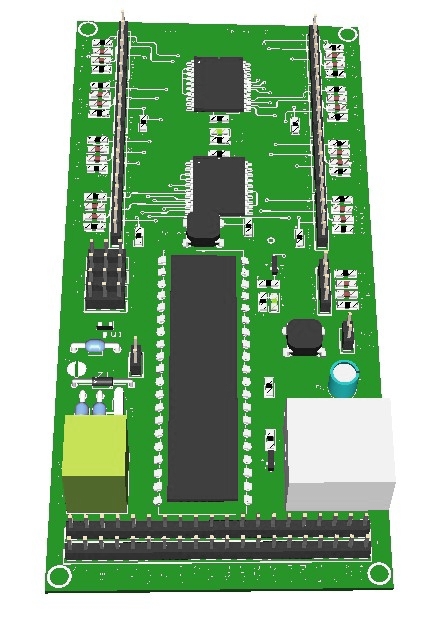
• PSCockpit Main Board V2:


PSCockpit System Prices:
The prices of the PCB’s already mounted and tested are the following:
NEW BOARDS:
- CPD pcbs for one CPD: 90€
- EHSI pcb: 20 €
- New Main V2 PCB: 80 €

Other boards:
- Digital expander for 40 inputs/outputs: 33 €
- Digital expander 16 inputs/outputs: 10 €
- Steppers/Other voltage outputs pcb: 28 €
- 7 segment displays pcb for 6 displays: 18 €
- Analogue pcb for 4 inputs/ 1 output: 20 €
- Yellow OLED display (85mm x 40mm), 256x64 for DED or PFL: 65 €
- I2CtoSPI pcb: 25€
- Aircore Controller pcb: 24€
- Aircore pcb: 15€
- Vibration motors pcb: 38€
- I/O Enhancement pcb: 6,5€
- Caution Panel board: 40€
- UHF board: 90€
- ICP pcb Rev 1: 90€
- CMDS board (with 2 rotary switches 30º & 45º, no toggles, no displays): 80€
- CMDS options:
- Miniature toggles 6 mm diam. (1 with locking lever): 50€
- SGL2016 displays Not available
- HDLG-1414 displays: 35€ (each)
- 7 segment displays pcb with 8 displays: 35€
- TWP board: 40€
- TWA board: 20€
- X40 stepper board: 20€
- PWM board: 20€
- ELEC board: 50€
- AUDIO1 & AUDIO2 board: 100€
- TRIM board: 80€
- TRIM INDICATOR board: 15€
- ECM pcb: 100 €

PSCockpit Displays&Gauges System Prices:
The prices of the PCB’s already mounted and tested are the following:
- Displays & Gauges pcb: 55€
- X27 stepper pcb: 15€
- Eyebrow lights pcb: 15€
- Indexer pcb: 15€
- Engine Gauges for Aircores with electronics for PSCockpit System pcb: 90€
- Engine Gauges for X27 or Aircores without electronics: 65€
- Hyd pcb: 15€

Other components by demand:
- Engine Gauges, Eyebrow and Indexer panels
- Gauge panels
- Stepper motors X27
- Aircore Motors

- Shipments: 10€/ 18€ / 28€ depending on the total weight order and country

Timeline:
- Orders and payments will be accepted until Feb. 18th. 2024
- Only direct bank transfers. Sorry for the inconvenience.
- Delivery: April 2024

Thanks everybody for your support.
Shep

Tuesday, October 3, 2023

HOW TO Configure the ECM Panel

For ECM pcb description, options and how to configure the expander address, see PSCockpit Quick Guide V.7 – ECM PCB. You can access the Quick Guide from Help/Quick Guide menu in the PSCockpit software.

The ECM pcb must be configured both digital expanders.

ECM-LIGHTS DIGITAL EXPANDER

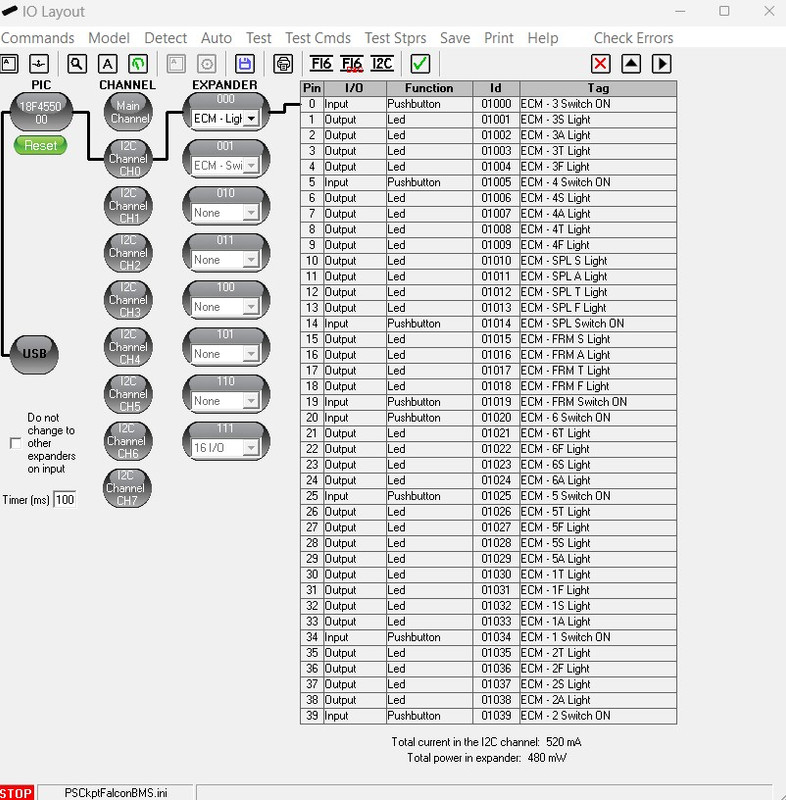
To configure the PSCockpit ECM-LIGHTS panel select the correct option from the Expander pull down list in the IOLayout page of the PS Cockpit Software at the correct I2C channel:


In case of there is some data already in the selected expander, the software will prompt you for continue:


The software will prompt you to setup the ECM panel in our Airplane model:


If you accept, the Airplane page will show up and the lights of the ECM indicator will be configured. 


The software will also prompt you to add the standard BMS commands for the ECM Lights pushbuttons:


If you accept, the software will prompt you to search for your BMS .key file, typically in ..\Falcon BMS vX.X\User\Config folder, and will automatically search for the keystrokes you have set in your .key file for the ECM Lights pushbuttons:


If any of the commands hasn't been set, you will see a warning indicating how many commands haven't been set and the Commands page of the PSCockpit software will appear:


Once the ECM panel is already configured you can modify the list of inputs/outputs as desire as well as the free I/O of the expander:


ECM-PUSHBUTTONS DIGITAL EXPANDER

In the same way the expander ECM-Pushbuttons can be configured in PSCockpit IOLayout:


This expander has only pusbuttons to configure. Just follow the procedure as above.

Once the ECM Pushbutton expander is already configured you can modify the list of inputs/outputs as desire as well as the free I/O of the expander:


Regards,

Shep


Saturday, April 15, 2023

Main Board V2 and ECM panel

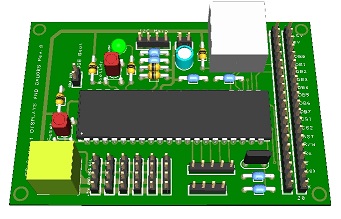
New PSCockpit Main Board V2 features:


You will find the following features in the new Main Board V2.
- Reverse power protection.
- Overvoltage protection.
- Power tracks augmented to avoid voltage drops.
- New power terminal block suitable for wire size ranging from 22AWG to 12AWG.
- SMD resistors and capacitors.
- New 18F4550 TQFP.
- Interrupt inputs moved to I2C channel connectors.
- Added power led.

Dimensions of the board and position of the connectors have been left in the same position for compatibility with the old version pcb.

ECM board


The ECM board has been designed to drive all leds and switches of the F-16 ECM panel.

The dimmer knob of the ECM is implemented in this pcb so you will be able to dim all the ECM lights.

The ECM board comes with the following elements:
- ( 1 ) 16 I/O chip to be connected to the digital I/O I2C channel of the PSCockpit system and its elements (resistors, connectors, …) to work with 5V to drive the switches of the left side of the ECM panel
- ( 1 ) 40 I/O chip to be connected to the digital I/O I2C channel of the PSCockpit system and its elements (resistors, connectors, …) to work with 5V to drive the switches and lights of the right side of the ECM panel
- ( 1 ) Dimmer pot and all the elements to control the dim action of the ECM lights
- ( 2 ) Toggle switches ON-OFF-ON with locking lever for XMIT and ECM power.
- ( 2 ) Pushbuttons for Reset and Bit
- ( 8 ) Pushbuttons for ECM lights
- ( 8 ) SMD yellow leds for ECM lights
- ( 8 ) SMD green leds for ECM lights
- ( 8 ) SMD red leds for ECM lights
- ( 8 ) SMD blue leds for ECM lights
- ( 9 ) SMD leds for lettering backlight.
- ( 10 ) Free digital I/Os

You will find the following elements in the backside:
- ( 1 ) Connector for backlight illumination.
- ( 2 ) Connectors for digital I/O I2C channel.
- ( 2 ) Mini-switch to select 16I/O and 40I/O chips I2C channel addresses.
- ( 1 ) Connector for free digital I/Os.

To complete the ECM panel, you will need to add the following elements:
- ECM front panel
- ECM Intermediate plate
- ECM pushbutton covers

Please check the dimensions of the ECM panel, intermediate plate and pusbutton covers here: https://www.mediafire.com/file/haikn6su1xrb20a/ECM_Panel-A3.pdf/file

To configure the ECM panel see this post

Regards,
Shep

PSCockpit and Displays&Gauges Systems 12th Run!!!


Time to launch a new run of the PSCockpit System!!
Those of you who don’t know yet how this system, please read the following links:

PS Cockpit System F16 distribution file for Main and Displays&Gauges boards: https://psfalcon.blogspot.com/2022/08/ps-cockpit-system-f16-distribution-file_17.html

PSCockpit System: PS Tools: https://psfalcon.blogspot.com/2020/01/pscockpit-9th-run.html

PSCockpit Displays and Gauges: PS Tools: https://psfalcon.blogspot.com/search/label/Displays%20%26%20Gauges

More information, downloads and guides at:https://psfalcon.blogspot.com/2015/05/pscockpit-system-up-to-date-software.html

This run features the new PSCockpit Main Board V2 and the ECM pcb:


More info about these boards to follow.

PSCockpit System Prices:
The prices of the PCB’s already mounted and tested are the following:
- New Main V2 PCB: 80 €
- ECM pcb: 100 €

- Digital expander for 40 inputs/outputs: 33 €
- Digital expander 16 inputs/outputs: 10 €
- Steppers/Other voltage outputs pcb: 28 €
- 7 segment displays pcb for 6 displays: 18 €
- Analogue pcb for 4 inputs/ 1 output: 20 €
- Yellow OLED display (85mm x 40mm), 256x64 for DED or PFL: 65 €
- I2CtoSPI pcb: 25€
- Aircore Controller pcb: 24€
- Aircore pcb: 15€
- Vibration motors pcb: 38€
- I/O Enhancement pcb: 6,5€
- Caution Panel board: 40€
- UHF board: 90€
- ICP pcb Rev 1: 90€
- CMDS board (with 2 rotary switches 30º & 45º, no toggles, no displays): 80€
- CMDS options:
- Miniature toggles 6 mm diam. (1 with locking lever): 50€
- SGL2016 displays Not available
- HDLG-1414 displays: 35€ (each)
- 7 segment displays pcb with 8 displays: 35€
- TWP board: 40€
- TWA board: 20€
- X40 stepper board: 20€
- PWM board: 20€
- ELEC board: 50€
- AUDIO1 & AUDIO2 board: 100€
- TRIM board: 80€
- TRIM INDICATOR board: 15€

PSCockpit Displays&Gauges System Prices:
The prices of the PCB’s already mounted and tested are the following:
- Displays & Gauges pcb: 55€
- X27 stepper pcb: 15€
- Eyebrow lights pcb: 15€
- Indexer pcb: 15€
- Engine Gauges for Aircores with electronics for PSCockpit System pcb: 90€
- Engine Gauges for X27 or Aircores without electronics: 65€
- Hyd pcb: 15€

Other components by demand:
- Engine Gauges, Eyebrow and Indexer panels
- Gauge panels
- Stepper motors X27
- Aircore Motors

- Shipments: 10€/ 18€ / 28€ depending on the total weight order and country


Time Line:
- Orders and payments will be accepted until May. 31st. 2023
- Only direct bank transfers. Sorry for the inconvenience.
- Delivery: Starting July 2023

Thanks everybody for your support.
Shep

Saturday, January 14, 2023

PSCockpit Displays&Gauges Software V.1.0.1 Update

The new version V.1.0.1 auto installable version of the PSCockpit  Displays&Gauges Software is available for download!!

Do not forget to install and run this version with admin rights!

You can download it at: Download

Firmware update is needed to use DED and PFL brightness and "Show PFL on DED" new functionalities. You can update firmware from the Help/Software Update option.

PSCockpit Displays&Gauges Software V.1.0.1 Changelog:
- Revised Shared Memory Area for BMS 4.37
- Added Firmware update procedure (Help/Firmware Update)
- Revised PSDisplyas&Gauges Quick Guide to version V2 (Help/QuickGuide)
- Updated help links (How To's Online)
- Changed Export .lua files for DCS 2.7.18
- Changed Clock routine to use winding features in DCS F-16
- Added keystroke timer (Options)
- Added DED and PFL brightness control encoder in Caution Panel pcb (Quick Guide)
- Added pcb's DIP pictures to show on forms. 
- Added DCS G-force reading to F-16 airplane.
- Added advise on the right bottom corner when PSCockpit is not used with Administrator rights
- Added auto installation of the DCS export files for PSCockpit (Options)

- Corrected COMPASS and Oxygen Pressure gauges that were swaped. For existing installations. please change this lines in your .ini file
as follows:
STPR06=12,Oxygen Pressure,......
STPR12=6,Compass,......

- Revised the "Show PFL on DED" funtionality to meet the new operation of the PFL of BMS 4.36 (Airplane Model /Special I/Os): As the PFL doesn't show "All systems OK" in BMS 4.36, the first push of F-ACK pushbutton, the PFL will show up in the PFL display and no command will be sent to BMS. The DED display will show up again the fitfh F-ACK pulsation.

Regards,
Shep

PSCockpit Software V.1.0.5 Update

 The new version V.1.0.5 auto installable version of the PS Cockpit Software is available for download!!


Do not forget to install and run this version with admin rights!

You can download it at: Download

No need to update the firmware of the Main Board. Last firmware version is 1.6.4, visit: PS Cockpit Firmware Update v 1.6.4

PS Cockpit Software V.1.0.5 Changelog:
- Revised Shared Memory Area for BMS 4.37
- Added Firmware update procedure (Help/Firmware Update)
- Revised PSCockpit Quick Guide to version V6 (Help/QuickGuide)
- Updated help links (How To's Online)
- Added keystroke timer (USB Timers)
- Added log file for error tracking (Settings)
- Added configuration for the new Trim pcb (PCB Layout) 
- Revised Main Board connection sequence for better indication (PCB Layout)
- Added pcb`s auto detect option (PCB Layout)
- Added 2.1.9 vJoy version (vJoy)
- Added DCS G-force reading to F-16 airplane.
- Changed Export .lua files for DCS 2.7.18
- Changed speed brakes function from proportional to full value when value is higher than 2%.
- Changed Clock routine to use winding features in DCS F-16
- Added Help tips all alone the program to view related information from the QuickGuide and/or the Online Help
- Added advise on the right bottom corner when PSCockpit is not used with Administrator rights
- Added auto installation of the DCS export files for PSCockpit (Settings)
- Added new form to see pcb's configuration settings (IO Layout)
- Revised SGL2016 and HDGL displays to delete all chars when existing the program
- Revised the "Show PFL on DED" funtionality to meet the new operation of the PFL of BMS 4.36 (Airplane Model /Special I/Os):
As the PFL doesn't show "All systems OK" in BMS 4.36, the first push of F-ACK pushbutton, the PFL will show up in the PFL display and no command will be sent to BMS. The DED display will show up again the fitfh F-ACK pulsation.

Regards,
Shep